




 Lafanda
 25 May, 2026
Rip Blu-ray/DVD
25 May, 2026
Rip Blu-ray/DVD

The Only Ripper to Support Both DVD & Blu-ray
Forward this article:



 Key Takeaways
• “Ripping an encrypted DVD is like a guessing game.”- From Windows Insider Program
• “Has anyone here reached a stable setup on Apple Silicon? What drive and Mac Blu-ray ripping software combo are you using?”- From Reddit
• “I just bought an external DVD drive to rip DVDs of home videos into digital files. Ideally, they would be .MP4 or something similar. What app do you recommend? I have to rip about 30 of them so hopefully something easy!”-From Reddit
With the popularity of streaming platforms and storage devices like USBs and hard disks, DVDs are gradually going out. Nonetheless, when we want to save old DVDs to our computer with high quality, it’s a struggle to find a useful Mac DVD ripper. Many people are seeking an answer to how to rip DVDs on a Mac freely and effortlessly. In this post, we’ll share the Top 10 best Mac DVD ripper to rip a DVD as digital files, enabling you to enjoy old but classic DVD movies without any restrictions!
(All products are only for backing up purchased DVDs for personal use. Online piracy is not supported.)
 How We Test:
To obtain truthful performance on macOS, we tested 10 DVD rippers on MacBook Pro across diverse hardware, including M1/M3/M5 Apple Silicon and Intel-based macOS Sequoia 15. We choose various DVDs, including scratched/damaged DVDs, and DVDs with Disney 99-title and Sony ARccOS protections, placing emphasis on their decryption ability, ripping quality, system compatibility, etc.
Since new Macs (such as MacBook Air/Pro) don't have CD drives, you must first equip with an external one. A standard USB 3.0 or USB-C external DVD drive (or Blu-ray drive if you have HD discs) is required. If your drive uses USB-A, ensure you have the right dongle.
Step 1. Open another Mac with the optical drive, insert the target DVD. Then click Apple Menu >System Setting/Preferences > General > Sharing.
Step 2. Navigate to DVD or CD Sharing and turn it ON.
Step 3. On your Mac computer, go to Finder. Choose Remote Disc under the Locations.
Step 4. You should see the icon of the other Mac and double-click it. Then tab the Connect/Ask to Use to access the DVD content.
Note
The way is unsuitable for any protected DVD or DVD movies.
After going through details of the 10 best free DVD burners, you can further compare their basic similarities and differences, so that select the best one to use:
| Best for | Input Formats | Rip Protections | Output Formats | Video Quality | System | |
|---|---|---|---|---|---|---|
|
Rapid ripping without losing quality
|
Homemade and commercial Blu-ray/DVD discs, folders, ISO files
|
APS, CSS, ARccOS, CPRM, AACS, or region codes
|
300+
|
4K
|
Windows 11/10/8.1/8/7/XP & MacOS X 10.7 or higher
|
|
|
Rip short DVD videos
|
Homemade, commercial, damaged/workout/99-title DVD, ISO, Video_TS, DVD folder
|
CSS, region codes, RCE, or Sony ARccOS
|
350+
|
480p to 720p/1080p
|
Windows 7 or later & MacOS X 10.6 or later
|
|
|
Homemade DVD ripping
|
most common multimedia files and unprotected DVD or Blu-Ray sources
|
❌
|
MP4, MKV, and WebM
|
Up to 1080p
|
Windows 10 or later, macOS 10.13 or later, Linux, and other
|
|
|
Rip DVDs to more output formats.
|
Normal/Commercial DVD, ISO image, DVDmedia
|
RCE, CSS, ARccOS, X-project, region codes
|
350+
|
Lossless
|
Windows 98, NT, 2000, 2003, XP, Vista, Windows 11/10/8/8.1/7 & MacOS X 10.5 and above
|
|
|
Free Rip DVDs before version 2.6.6
|
Common DVDs
|
❌
|
DVD folder, ISO image containing the original VOB files
|
High
|
MacOS X 10.5 (Leopard)
|
|
|
Rip DVDs and Blu-ray discs to MKV.
|
Protected DVD and Blu-ray discs
|
AACS and BD+
|
MKV file
|
Medium
|
Windows, Mac OS X, and Linux
|
|
|
Open-source and cross-platform supported.
|
DVDs, Audio CDs, VCDs
|
CSS, region codes, and UOPs
|
19
|
Medium
|
Windows XP SP3 or later & MacOS X 10.7.5 or later
|
|
|
People need more advanced functions.
|
Commercial, rental, damaged, and recorded DVD, ISO image files, and Video_TS folders
|
CSS, APS, RC, RCE, Sony ARccOS, UOPs, RipGuard
|
1000+
|
4K/5K/8K
|
Windows 11/10/8.1/8/7 (32/64 bit) & macOS 10.13 - 15.x
|
|
|
Powerful managing toolkit of multi-functional options
|
commercial/noncommercial DVD
|
Region codes
|
180+
|
High
|
Windows 11/10/8.1/8/7 & MacOS 10.13/10/14/15/26
|
|
|
DVD Ripper with built-in downloader and editor
|
DVD/Blu-ray discs, Video_TS/BDMV folders, and ISO.
|
CSS, UOP, Disney X-project, AACS, BD+, MKB
|
600+
|
4K/8K
|
Windows 10 or later & macOS 10.15 or later
|
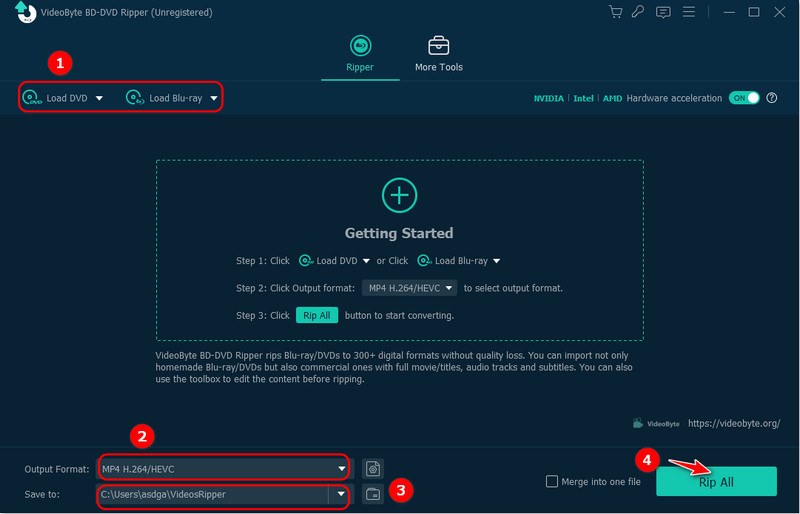
VideoByte BD-DVD Ripper has enjoyed a great reputation among a group of loyal users. This professional DVD ripping software has optimized hardware acceleration (HEVC/H.264 encoding engine) for Apple Silicon (M1/M2/M3). It works for all types of DVDs and Blu-rays without limitations. You can bypass the latest protections and convert DVDs to popular streaming formats or hard drives at a 1:1 ratio in lossless 4K output. Built-in video editor tool allows you to edit your DVD movie (cut, crop, rotate, merge, adjust effect, add filter, and add watermark), creating a unique version yourself. Plus, during the conversion, you can preserve, add, or select audio tracks and subtitles as you like.
 Pros
Pros
 Cons
Cons
Follow the steps to rip DVDs for Mac without hassle:
Step 1. Put the disc in your connected drive first. Go to the app on your Mac, click Load DVD, and choose the target drive. If you want to load a DVD ISO image file or DVD folder, directly drag it to the main interface.
Step 2. The app will automatically identify and locate the main movie. You can also click Full Title List to select other files.
Step 3. Personalize the output format and change the storage location.
Step 4. Press the Rip All button, then you can get ripped DVD content to MP4, MKV, MOV, or other formats to your computer.
If you consider a free DVD Ripper for Mac, WinX DVD Ripper Free Edition can be a rational option. This app offers 350+ video and audio codecs to save the ripped DVD disc, enabling you to store and play the files on more compatible devices as well as media players without format restriction.
One downside of the program should be its limitation set for free usage – only 5 minutes of the DVDs can be ripped. To remove this restriction for longer ripping, you need to pay for its upgraded version. But for short DVD video ripping, the free edition is still worth trying.

Pros
Cons
For a detailed review, you can read this post: WinX DVD Ripper Review: Is It the Best Ripper to Rip DVD?
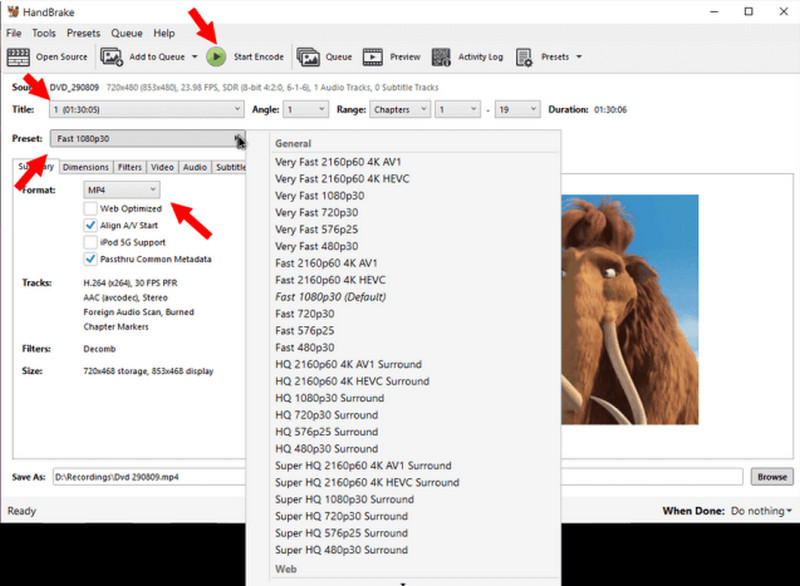
HandBrake is another free Mac DVD ripping software available to convert DVDs to MP4, MKV, and WebM. As a multi-functional and open-source DVD ripper, it offers mainstream video and audio codecs, such as H.265 and H.264, MPEG-4 and MPEG-2, FLAC, AC3, etc., to save ripped media files. Note that if you use the software to rip DRM-protected DVDs, it will fail to fulfill your demand.
Pros
Cons
Tips
Unlike HandBrake, VideoByte BD-DVD Ripper is well compatible with all types of encrypted DVD ripping to a digital format.
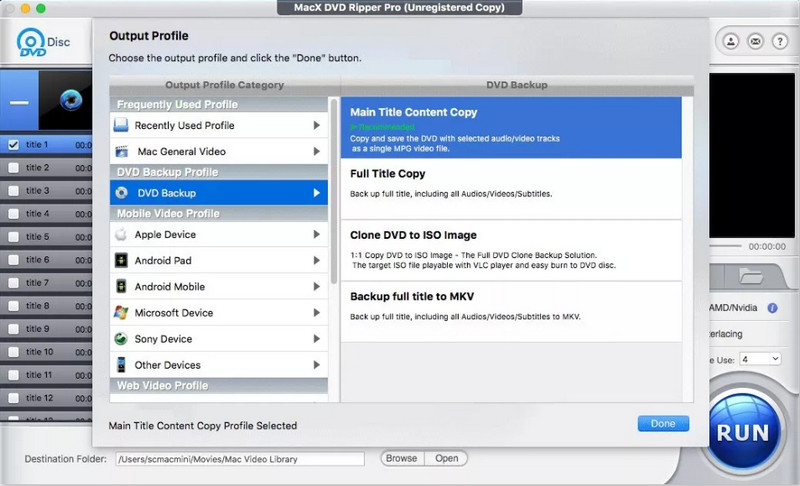
MacX DVD Ripper Pro is a powerful and time-saving Mac DVD ripper. It can rip all sorts of DVDs, and supports over 350 profiles to let you directly make the ripped DVD videos compatible with the targeted devices in one shot. Ripped content will retain a 1:1 ratio without compression. You can still enjoy the equally high-quality DVD videos with original audio and subtitles.
Pros
Cons
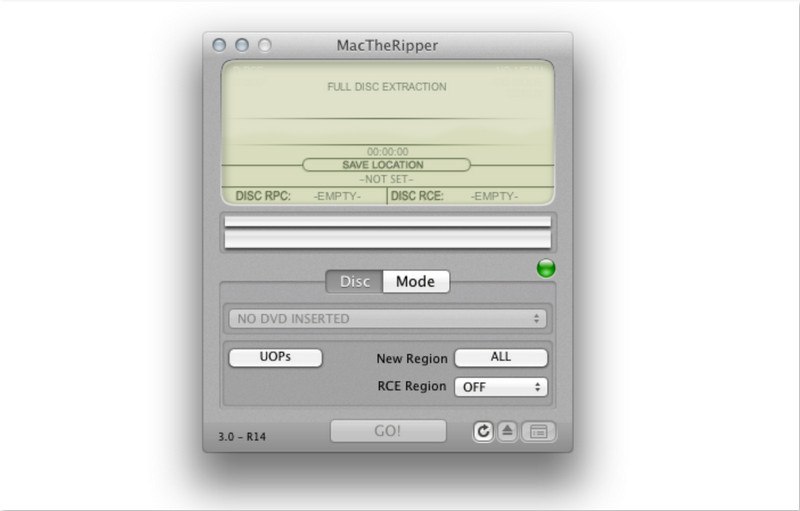
MacTheRipper is a classic DVD ripper which suited for Mac OS X 10.5 Leopard and older. It doesn’t rely on the DVD drive to get the CSS decryption keys, which means that you can play the DVD without DVD Player in order to rip it. The free DVD ripper software can rip unprotected or homemade DVDs to the VIDEO_TS folder or an ISO Image file. Although both can be played with the default DVD player on your Mac, you may not be able to play them on other devices.
Pros
Cons
Tips
To rip encrypted DVDs to more digital formats and preset profiles, VideoByte BD-DVD Ripper is a better choice. It has great power to decrypt and maintain a 1:1 ratio to save lossless-quality DVD videos to 300+ formats provided.
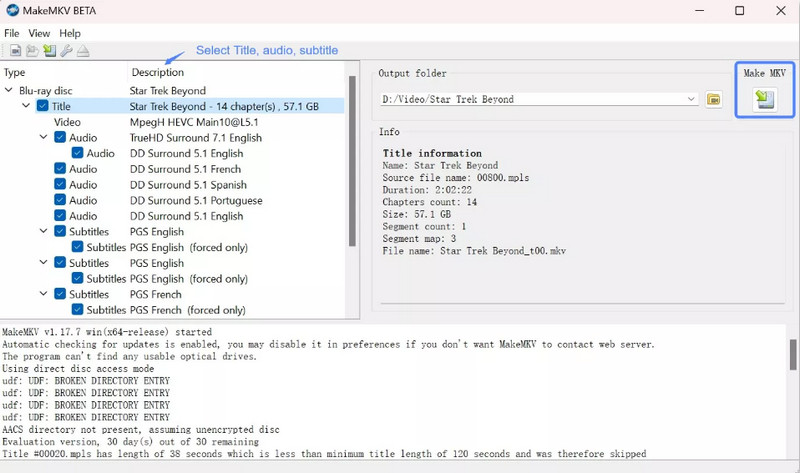
MakeMKV is a reputable Mac DVD ripping program that works to rip DVDs and Blu-ray discs protected by CSS, CPPM, AACS, and BD+. It’ll extract movies and videos from disks to MKV files with original video quality and all metadata info.
Pros
Cons
It’s cumbersome to convert the video files to other formats. Also, it would take longer to complete the uncompressed DVD ripping, costing even hours to output MKV files of really large sizes.
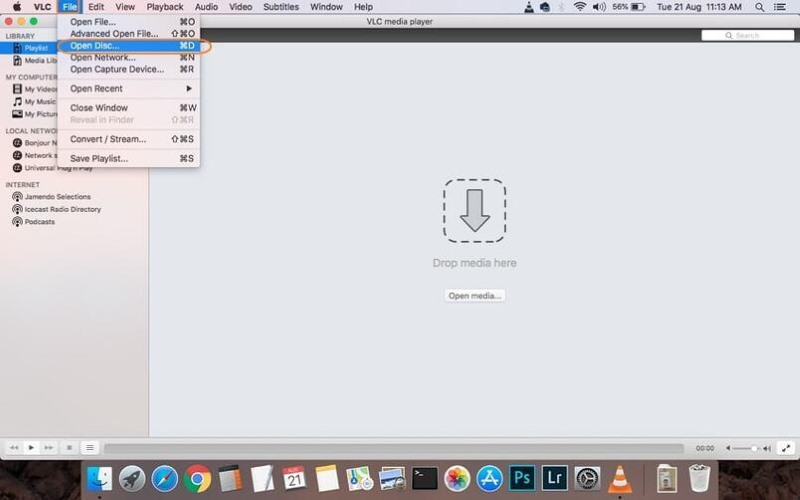
More than a media player, VLC also offers a hidden free DVD ripper to get digital copies of DVD discs without a complicated process. It offers mainstream formats and decent quality to output ripped videos, even with full audio tracks and subtitles preserved, allowing you to enjoy smooth and convenient streaming within the software directly.
Pros
Cons
Note that VLC doesn’t support ripping protected DVDs. Originally, you had to install more files to access its decryption ability. Also, due to without acceleration technologies, you need to wait a long time while it deals with the DVD ripping.
VideoByte BD-DVD Ripper is one of the few programs that can improve the ripping speed to 6X based on the Mac M3 chip's GPU acceleration. And it possesses advanced decryption technology, so it doesn't need manual libdvdcss installation.
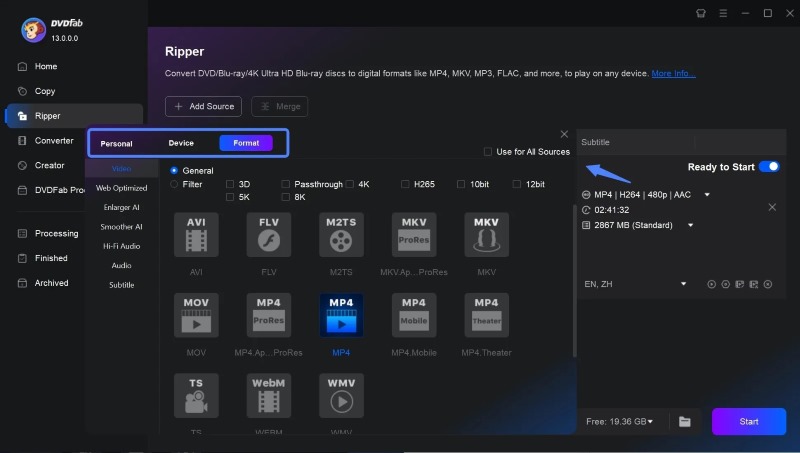
DVDFab DVD Ripper is a versatile tool that works as a DVD ripper, a video enhancer, and a video editor. It can rip digital DVDs to 1,000+ popular formats and scale up video resolution from 480p to 1080p. Also, you can crop/trim/merge videos, add watermarks/subtitles, or adjust the brightness with its editing feature.
Pros
Cons
No matter CSS, APS, RC, Sony DADC, or other type of protection, DVDFab DVD Ripper can convert DVDs with lossless video quality. You May Also Like: DVDFab Alternative – Rip Your Blu-ray/DVD disc to Digital.
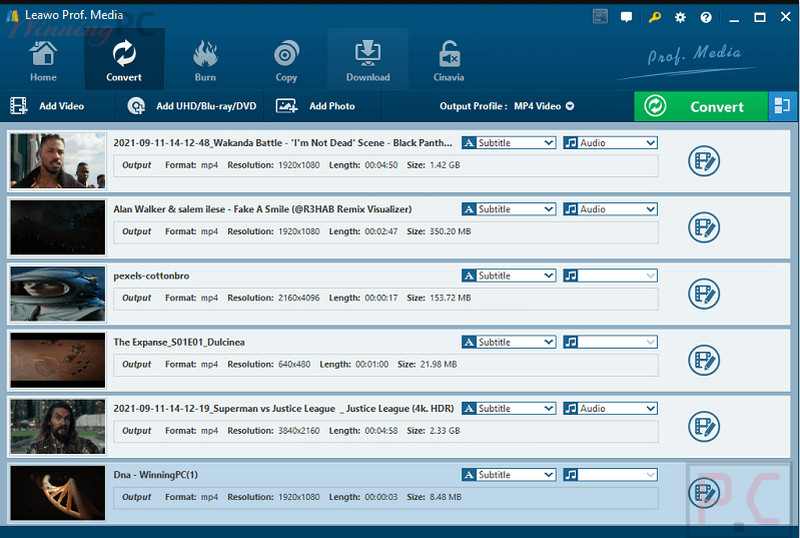
Leawo DVD Ripper for Mac is regarded as one of the best Mac DVD rippers to rip DVDs to 180+ popular formats to be compatible with YouTube, Facebook, Instagram, TikTok, and other online streaming sites. Moreover, this all-in-one software offers a range of tools like a video editor, 3D movie creator, DVD player, and disc region restriction removal tool.
Pros
Cons
Better yet, it enables you to customize output parameters, including video/audio codec, video size, bit rate, aspect ratio, frame rate, channel, etc. If you want a dedicated DVD conversion, it’s a nice Mac DVD ripper for you.
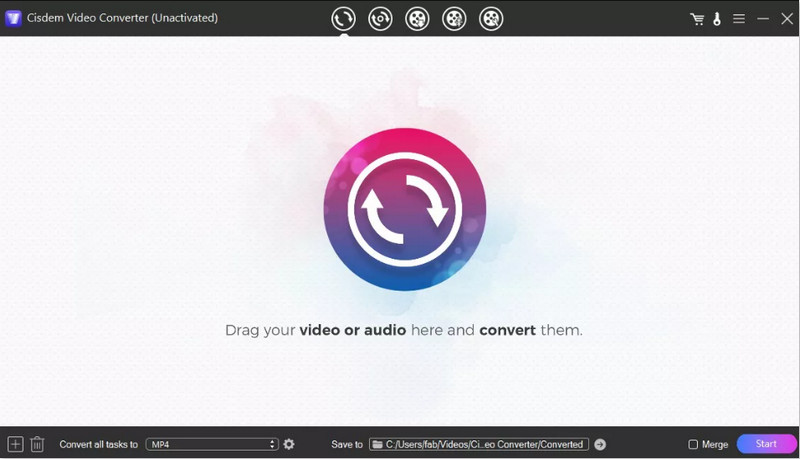
Cisdem Video Converter is an all-in-one Mac DVD ripper with multi-functional features. It delivers professional ripping ability to deal with both encrypted and homemade DVD discs to 300+ formats. In addition, the flawless original can be preserved without affecting the playback quality.
Pros
Cons
In addition, it often runs slowly and even crashes due to being equipped with a built-in video editor, downloader, and media file converter for better video management. Yet, to utilize all the functions provided by this Mac DVD ripper, you will have to purchase an extra subscription.
Q1: Is it legal to rip a DVD on a Mac?
A: Rip your homemade DVDs for personal use is usually legal, but copying commercial DVDs may violate laws in some regions. Use the free DVD rippers responsibly and comply with local regulations.
Q2: How to choose the best DVD ripper?
A: Pick a DVD ripper that is compatible with your current operating system first. Then you should consider if the software is beginner-friendly and if its features meet your needs, such as supporting unprotected DVD files.
Q3: How to rip DVDs to a Mac?
Step 1. Insert the DVD into the drive and click Load DVD to select the drive.
Step 2. Choose a DVD content and click Rip All to select the output formats.
Step 3. Adjust the Destination Folder and press Rip All to start the ripping process.
After reading the comprehensive review of the 2026 top 10 best DVD Rippers for Mac, I’m sure that you already have the desired one. VideoByte BD-DVD Ripper, the amazing Mac DVD ripper, facilitates all types of DVD ripping to more than 300 popular formats with lossless quality and faster speed. Taking the plunge to enjoy free playback of your favorite DVD collections anywhere and anytime!
Hot Articles
by in 15 October, 2025
by in 21 April, 2026
by in 25 May, 2026

 English
  Korean
  Dutch
Dutch  Chinese
  Italian
  Spanish