




Burn Videos to DVDs and Blu-ray Discs Effortlessly
Forward this article:



 TL:DR
TL:DR
The post covers 11 popular DVD burning software on the market in 2026. We have done a side-by-side comparison among them, and it is not easy to say which one is the best. Based on 15-day testing, the top 3 picks were selected ultimately:
🥇 VideoByte DVD Creator: Both support Win/Mac systems while delivering the most cost-effective DVD burning features.
🥈AnyBurn: A robust DVD burner that is free and user-friendly on Windows.
🥉Burn: Simple but advanced disc burning for macOS.
Although digital media provides a more convenient streaming experience, it also poses risks of data loss. Whether you want to back up videos to DVD or create your own DVD collections, a DVD burner is a must-have tool. Therefore, this post provides comprehensive reviews of the 11 best DVD burner software. Now, please walk through them and select the best option for you.
The chart below gives you a first look, comparing 11 best DVD burning software to help you better sort out the one you’ll need.
| Software | Formats Supported | Disc Types | Menu Templates | Enhance Video | Edit Audio/Subtitles | Pricing |
|---|---|---|---|---|---|---|
|
300+ formats
|
DVD-5, DVD-9, BD-25 and BD-50
|
√
|
√
|
√
|
From $24.95 (free trial available)
|
|
|
AVI, MOV, MPG, VOB, MP4, WMV, MKV
|
CD, DVD and Blu-ray of all types, including M-Disc
|
×
|
×
|
×
|
From US$29.95 (free version available)
|
|
|
MP3, WMA, WAV and popular video formats
|
CD, DVD, and Blu-ray discs
|
×
|
×
|
×
|
From US$49 (free version available)
|
|
|
MP3, M4A, FLAC, APE, WMA, WAV, etc.
|
CD, DVD, Blu-ray supported
|
×
|
×
|
×
|
Free (provides another pro version)
|
|
|
MP4, MOV, WAV, MP3, OGG, WMA, ISO, etc.
|
CD-R, CD-RW, DVD-R, DVD+R, DVD-RW, DVD+RW, etc.
|
×
|
×
|
×
|
Free
|
|
|
HEVC (H.265) video, HEIC/HEIFC image, MP3, WAV & OGG audio and lossless APE, FLAC formats
|
CD/DVD/Blu-ray
|
√
|
√
|
√
|
From US$69.99 (free trial available)
|
|
|
180+ formats
|
DVD-5, DVD-9, BD-25 and BD-50
|
√
|
√
|
√
|
From US$54.95
|
|
|
200+ formats
|
DVD-9, DVD-5, DVD±R/RW, and DVD±R DL
|
√
|
√
|
√
|
From US$46.99 (free trial available)
|
|
|
150+ formats
|
DVD-9, DVD-5, DVD-R/RW, DVD+R/RW, DVD+R DL, DVD-R DL, DVD-RAM; BD-R, BD-RE, BD-25, BD-50, BD-100
|
√
|
√
|
√
|
From US$29.95 (free trial available)
|
|
|
AVI, MOV, MP4, MPEG, OGG, WMV and other file formats
|
DVD
|
√
|
×
|
√
|
Free
|
|
|
HPS+, UDF, Joliet, DVD Video, VCD, SVCD, Divx, Cue/Bin, Toc
|
VCD, SVCD, DVD and DivX disks
|
×
|
×
|
×
|
Free
|
How We Test:
To obtain unbiased, repeatable results, we test each DVD burning software in controlled, detailed laboratory and real-world playback scenarios. We bought a pack of blank discs and spent 48 hours testing these tools firsthand. We used different video files, such as MP4 videos (1GB–5GB) and multi-episode movie series, to test burning performance on Windows 7/11 and macOS. We timed real burning speeds, verified final video quality on a home DVD player, and tracked the success rate of each tool – you don’t want to waste any blank disc!
• Brief Summary: Fast burning of videos to DVDs in 4K resolution without quality loss.
| Supported OS | Windows 11/10/8/7/Vista/XP (SP2 or later); Mac OS X 10.9 or above (macOS Catalina included) |
| Price | From $24.95 (free trial available) |
Designed with an intuitive interface, VideoByte DVD Creator is the top-ranking DVD burner with fast speed and lossless quality. It can maintain the original 4K quality while burning videos onto DVD discs. With acceleration technologies, it can speed up the DVD burning process to blazing speeds. Converting high-quality long videos can take just a few minutes!
With strong compatibility, VideoByte DVD Creator supports importing a wide range of file formats, including AVI, MPEG, 3GP, MP4, VOB, and FLV, and even supports 3D video. Currently, the most popular DVD types, such as DVD-5, DVD-9, BD-25, and BD-50, are supported for creation via VideoByte DVD Creator, making it one of the best DVD burning software selected by a large number of users around the globe.
• Available to create DVD as well as Blu-ray Disc/folder/ISO image.
• Compatible with inputs of a variety of formats, including 3D.
• Fully maintain original resolutions at HD or even 4K without loss.
• Advanced video editing features and preset menu templates available.
• Chapters, subtitles, and audio tracks are available to be highly customized.
• Watermark adding feature available to protect the DVD copyright.
• Built-in editing tools like DVD menu creation, customizable subtitles and audio tracks, and video enhancement.
Test Results:
| Video Length | Disc Type | Creating Results | Creating Time |
|---|---|---|---|
| 15 min | DVD-5 | Succeed | 1min30s |
| DVD-9 | Succeed | 2min15s |
Overview by Kelvin Smith from G2, VideoByte DVD Creator can burn videos into DVDs and Blu-ray Discs/Folder/ISO easily and professionally. In our test, all burning tasks were done perfectly with VideoByte. We checked the quality of DVDs, and there are no playback problems, such as laggy loading, out-of-sync of sounds and pictures, etc. It worked flawlessly! A user on Reddit said, “…need to make the data video files to DVD files first. I have tried VideoByte and can make data files to DVD files, then burn them to discs. all very simple without error.”
Brief Guide to Burn a DVD via VideoByte DVD Creator
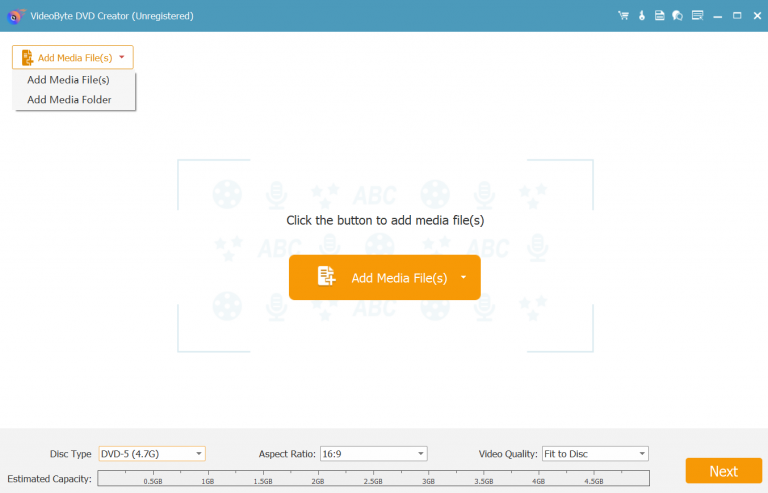
Step 1. Insert a blank DVD disc into the computer. Subsequently, run VideoByte DVD Creator and select a disc type to proceed with DVD burning.
Step 2. Please click on the "Add Media Files" button to import the videos you want to burn to the DVD disc.
Tips: After importing videos into the software, you can use its built-in video editor to adjust video effects, add subtitles and audio tracks, and even customize menu themes before proceeding with disc burning.
Step 3. Once the editing ends, go to "Preferences" and personalize the output format as well as the output disc location. Then, simply by pressing the "Next" button, VideoByte DVD Creator will burn these videos to the blank DVD disc in no time.
• Brief Summary: Processing quick CDs and DVDs, with a free version available for burning.
| Supported OS | Windows only (Windows 11 and M-Disc) |
| Price | From US$29.95 (free version available) |
If you are looking for a free CD and DVD burner to create your own CDs/DVDs without paying a penny, BurnAware provides a free version to help. Regarded as the best Windows DVD burner software, BurnAware provides hassle-free help to burn your favorite music and MKV videos to DVD, Blu-ray, CD discs, and ISO images with just a few clicks. It delivers a user-friendly interface that allows new users to quickly familiarize themselves with its key features.
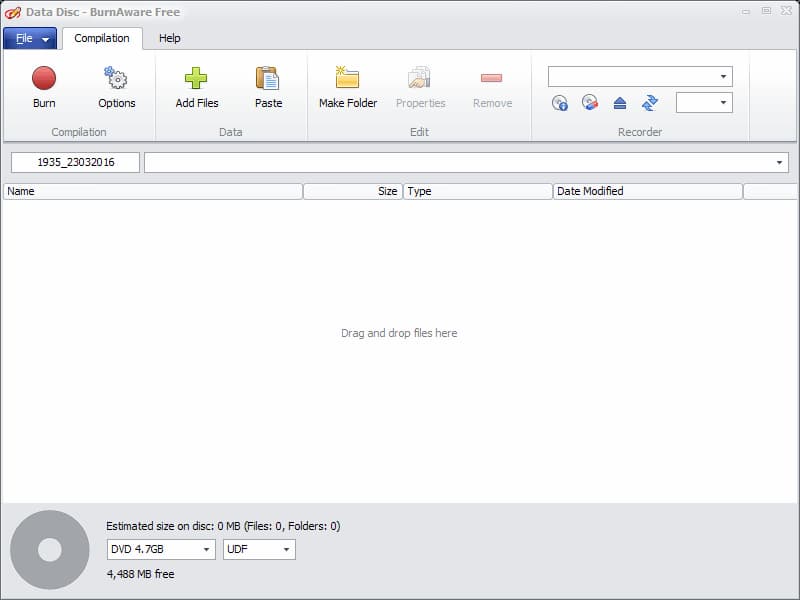
BurnAware is extremely suitable for CD burning, thanks to its ability to preserve original audio quality, helping you get high-quality CD copies of your favorite songs. The software offers advanced options to let you take full control over your CD/DVD burning, making it one of the best CD and DVD burning software programs you can’t miss.
I tested BurnAware on my LG Blu-ray burner. The video is large (around 20GB total), so I thought it might take several hours to burn it. After no more than 10 minutes, I hear a beep, and the DVD burner ejects the DVD. At first, it took some time to load the DVD. I thought that have encountered errors…but no!
• Brief Summary: Quick burning of CD, DVD, and Blu-ray discs for free with decent quality.
| Supported OS | Windows 11/10 |
| Price | From US$49 (free version available) |
The reliable DVD burner, Ashampoo Burning Studio Free, is another expert at handling videos for DVD burning. Despite this, it is also compatible with CD making from MP3, WMA and WAV audio files. Hence, if you have both DVD and CD burning needs, Ashampoo Burning Studio Free should be one of the best DVD burners to consider. The software also guarantees a fast burning speed and strong security, helping users safely save media content to CD or DVD without risk.
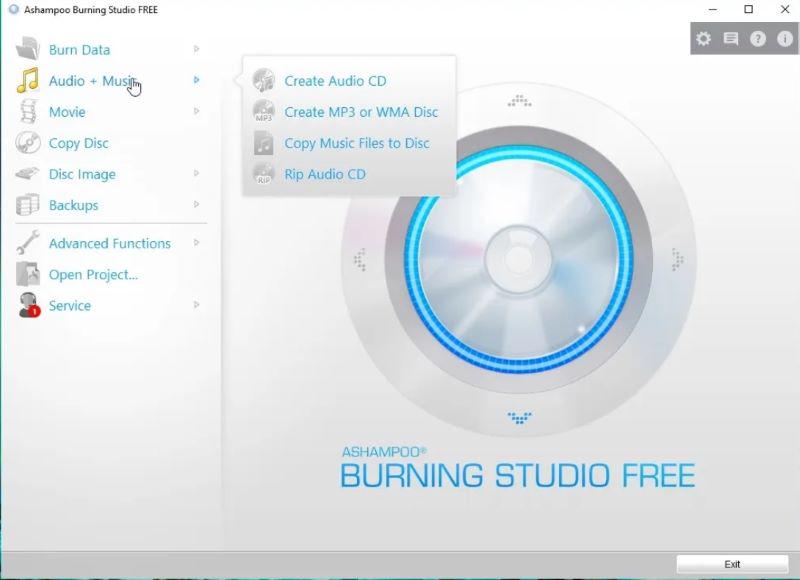
Ashampoo Burning Studio Free also provides some one-click basic editing features for those who desire to customize the content. For example, you can add your favorite background music or create a vivid background to display the content attractively. The free DVD burner also lets you customize the DVD menu creation for easy navigation. These functions will only be unlocked when you subscribe to the software. But for DVD burning, it is still considered one of the best programs for Windows 10 and 11.
• Convenient ways to burn DVDs and CDs without paying a penny.
• Extract audio from CDs to export as common music files of good quality.
• Preservation of HD resolutions to ensure good playback quality.
• Password protection feature to encrypt your DVD discs for higher security.
Limitation:
The testing results told me that the performance of Ashampoo is unstable. When encountering the issue that a DVD burned successfully on a computer can’t be played, someone used Ashampoo Burning Studio 24 to figure it out. But someone reported:
"When I insert a DVD-R (Memorex, new out of the box) burned with Ashampoo (version 6 Free) on a laptop running Windows 7 (32-bit) into the DVD player connected to an analog TV, the screen displays an error message…I then try the same with a different DVD player connected to a different analog TV – same results. I then burned a Phillips blank DVD with Ashampoo and followed the same process – same results." – Review from AnandTech Forums.
• Best for: Windows users looking for an easy way to burn CD/DVD/Blu-ray discs with just a few clicks.
| Supported OS | Windows 2000/XP/2003/Vista/7/8/8.1/10/11 |
| Price | Free (provides another pro version) |
The next recommended free DVD burner you can try is AnyBurn. With an intuitive interface, AnyBurn is easy to use and lets you back up videos and audio to DVD discs without hassle. It is well compatible with most mainstream video/audio formats at decent quality, such as MP3, FLAC, WAV, and more, allowing you to burn them to CD, Blu-ray, and more than just DVDs. For users who want basic DVD burner software compatible with a wide range of disc types, AnyBurn is one of the best options.
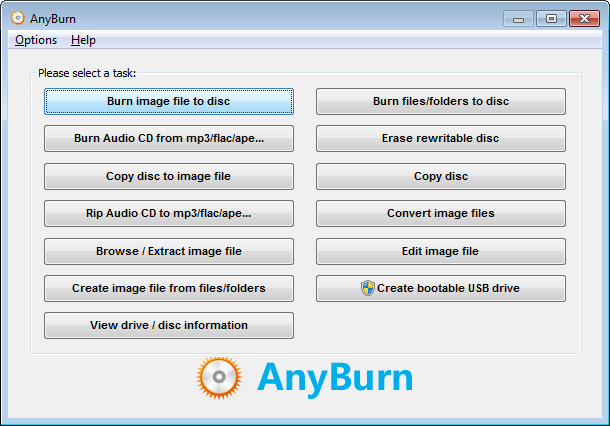
• Well compatible with the most mainstream audio and video formats.
• Available to burn media to DVD, Blu-ray, and also CD.
• DVD/CD ripping to common media files is also supported.
• Supported creating bootable USB drives on Windows systems.
However, as AnyBurn is only available for Windows systems, Mac users will need another alternative free DVD burner software for Mac to create DVDs.
Besides, after using AnyBurn for a while, I found that it gets system crashes from time to time. When I tried to burn a CD-R and add FLAC files to the program. The program would show me the "adding files" pop-up window and then just freeze and say (not responding), and it would stay like that for like forever. Well, I can only reboot the burner and try it again…
• Best for: Users who want a free, direct, and simple process to burn DVDs from videos on all Windows systems.
| Supported OS | Microsoft Windows 2000 or higher |
| Price | Free |
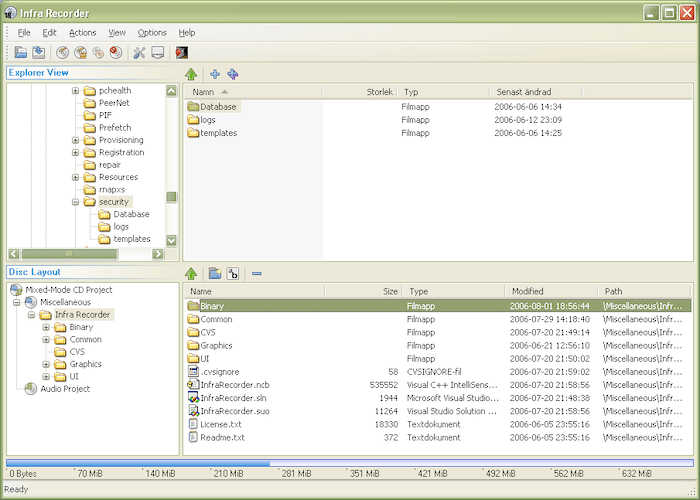
Another excellent DVD burning software for creating DVDs on computers is InfraRecorder. The video-to-DVD burner features multiple creative features to ensure a smooth DVD burning process. In addition to common DVD formats such as CD-R, CD-RW, DVD-R, DVD+R, DVD-RW, DVD+RW, etc., InfraRecorder also supports copying media to dual-layer DVDs and image formats ISO and BIN/CUE.
• Free to use.
• Both common DVD disc types and formats are supported.
• Clear interface for easier DVD burning processing.
• Disc erasing feature provided.
• Fixating discs service equipped.
However, as free DVD burning software, it has some disadvantages compared with professional alternatives. For example, it lacks editing features to customize the video effects before burning. It would take a long time to process, as no hardware acceleration is applied. If you're considering trying DVD burner software with more editing features to help create DVDs with personalized elements, such as adding your favorite background music, designing a unique and vivid menu, and so on, VideoByte DVD Creator is another decent option—it even supports creating DVDs on Mac!
• Brief Summary: Professional DVD burning of cinema-like quality.
| Supported OS | Microsoft Windows 11/10/8/8.1/7 |
| Price | From US$69.99 (free trial available) |
Power2Go is professional DVD burning software that lets users create high-quality DVDs on Windows PCs, making it an ideal tool for burning DVD movies. Besides DVDs, the software is also compatible with CD and Blu-ray burning. Supporting a wide range of media formats, Power2Go can convert media files of many popular formats (not only common formats like MP3, WAV, OGG, and lossless APE, FLAC, but also high-quality HEVC H.265 video encoder, HEIC/HEIFC recording formats) to DVDs, CDs, and Blu-rays with very easy operation.
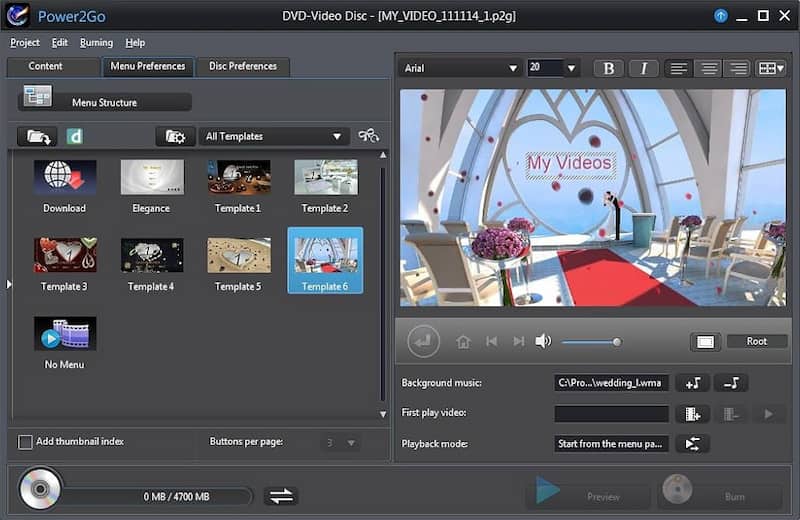
Another highlight of Power2Go is its professional yet easy-to-use editing features, which let you enhance video quality, add video effects, and other elements to achieve better results. Besides, this DVD burner also places great emphasis on the security of user data. By employing the advanced 256-bit encryption method, the software can protect the privacy of your computers and prevent data loss or disclosure.
• Drag-and-drop simple method to burn DVDs, CDs, Blu-rays, or even AVCHD movie discs without hassle.
• 256-bit encryption available to protect data security.
• Intelligent Smart Detect feature supports making optimal output settings for files.
• Free menu templates are provided to create personalized DVDs with ease.
• Built-in transfer feature is available to save media files to mobile devices with several easy taps.
However, it is noted that Power2Go requires a higher fee to access its full DVD burning features and lacks a Mac version. If you are a Mac OS user, it may not be your choice.
• Brief Summary: Burning 4K DVDs with full editing features.
| Supported OS | Windows 7/8/10; Mac OS X 10.13 and higher |
| Price | From US$54.95 |
If you are considering an all-in-one DVD burning software, Movavi Video Suite is the one you should not miss. This all-in-one software integrates a built-in video/audio converter, DVD burner, screen recorder, and editor. You can perform various tasks with it, such as creating DVDs, converting videos to other formats, or editing videos to make your own. As for DVD burning features, Movavi Video Suite can maintain high-quality output up to HD or even 4K.
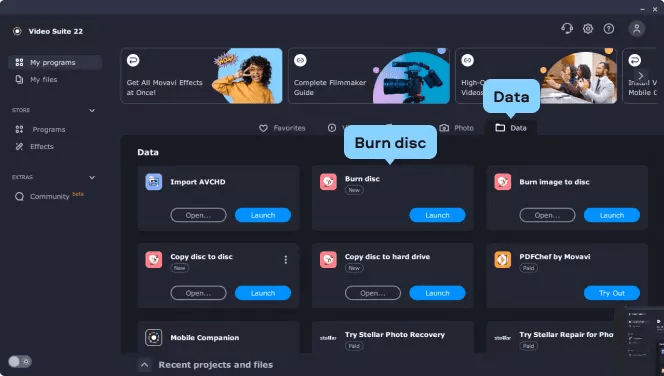
• Compatible with CD, DVD, and Blu-ray burning.
• HD and 4K video burning supported.
• All-in-one software with multiple functions built inside.
• Ensure great video resolutions regardless of what functions you process in the software.
• Rich effects available to customize better DVD outputs as you desire.
However, because the software can be resource-intensive, its DVD burning speed is affected, especially when you have many videos to transfer to a DVD. But it is still one of the best DVD creator software programs for those who want a multifunctional bundle.
• Brief Summary: Super-fast burning speed and a fully personalized menu creation feature to create DVDs vividly.
| Supported OS | Windows 11/10/8.1/8/7; Mac 10.10 – 13 |
| Price | From US$46.99 (free trial available) |
DVDFab DVD Creator is another nice DVD burning software if you want to create homemade DVDs with a simple, HD-quality process. It enables users to easily customize DVD menus to their personal requirements. It provides both static and dynamic menu templates to enable quick menu editing. For other elements, such as background art, thumbnails, text font, color, size, and so on, you can fully customize them to suit your DIY needs. With up to 50X faster burning speed supported, you won't spend much time burning DVDs with this DVD burner software.
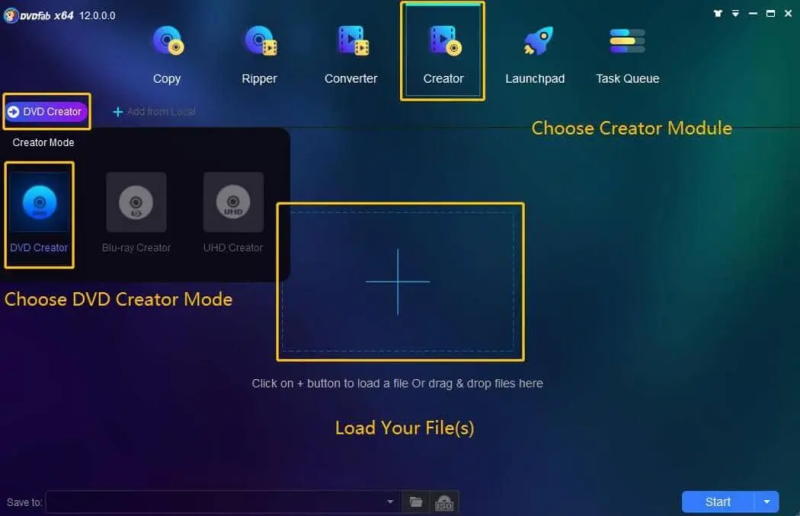
The great compatibility of DVDFab DVD Creator allows users to burn videos in more than 200 formats, including MP4 to DVD+R/RW, DVD-R/RW, DVD-9, DVD-5, DVD+R DL, and DVD-R DL. It could cover most needs, so users can burn MP4s to DVD or save their favorite videos as copies on DVD discs at home without hassle. However, since this DVD burner only supports creating DVDs, if you're asked to burn CDs or Blu-rays, DVDFab DVD Creator can’t exactly help. In my test, although DVDFab supports UHD 4K versions, it seems like it doesn’t have fully customizable menu support. As an alternative, try VideoByte DVD Creator, which will also help burn Blu-rays at 4K resolution!
• Great compatibility of 200+ mainstream formats.
• A variety of DVD disc types are supported.
• HD quality preserved to burn videos onto DVDs.
• Free templates available to customize the theme of the DVD content with ease.
• GPU acceleration tech is employed to guarantee fast speed in burning DVDs.
• Brief Summary: Create DVDs from all mainstream formats with fully customized editing features.
| Supported OS | Windows 10/8/7/Vista/XP; Mac OS X 10.7 or later |
| Price | From US$29.95 (free trial available) |
As all-in-one DVD burning software, Wondershare DVD Creator delivers the most professional functionality to help users create DVDs on Windows and Mac with minimal effort and maximum efficiency. The software is highly compatible with 150+ mainstream media formats, including MP4, and supports creating DVDs of popular types to meet most users’ needs. It ensures a rapid burn of the video to DVD, without wasting much time.
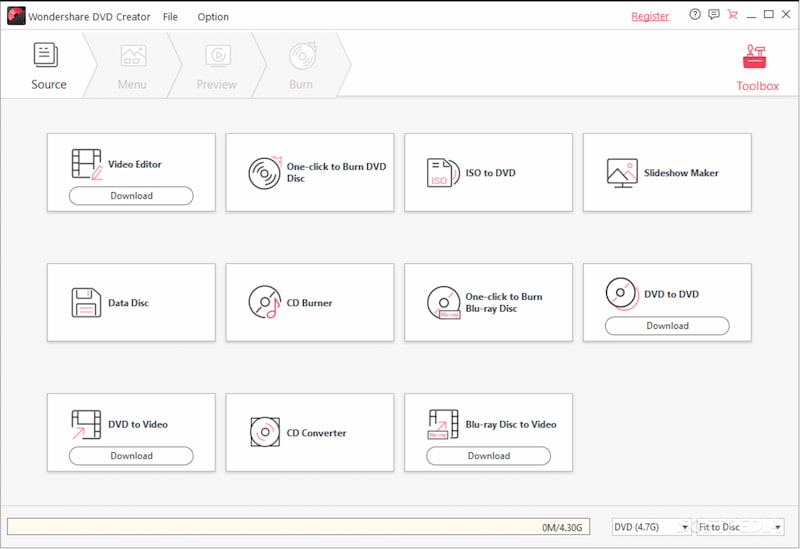
Wondershare DVD Creator provides built-in video editing tools to customize videos, including essential DVD menu-creation features. Also, the software supports creating CDs or photo slideshows with music without complicated processes. From all aspects, Wondershare DVD Creator is recommended as one of the best DVD burners for Windows and Mac, even for beginners.
• Compatible with 150+ media formats for all DVD/Blu-ray disc types/folders/ISO image files.
• Easy-to-grasp video editing functions are available to enhance the videos before burning.
• Feasible CD burner available.
• Built-in DVD menu creator and slideshow maker supported.
However, Wondershare DVD Creator does not support Windows 11. Therefore, if you’re a Windows 11 user, Wondershare cannot assist you.
User Review:
I want to put encoded MP4 files (2.53 GB) on a separate DVD with a basic menu that won't make the size way beyond what a DVD can fit. But on Wondershare DVD Creator, it says the end file size is gonna be 8.35 GB. Too large!
• Best for: Users looking for lightweight DVD burner software to burn videos to DVD on various devices.
| Supported OS | Windows, Mac OS X 10.15 or later, Linux |
| Price | Free |
More than cross-platform supported freeware for burning DVD from a lot of popular formats such as AVI, MOV, MP4, MPEG, OGG, WMV, and so on without cost, users are able to create awesome DVDs via DVDStyler freely but with style-rich menu templates on Windows, Mac, and also Linux computers effortlessly. This DVD burner provides numerous templates to help users create personalized DVDs however they want. With its simple editing tools, DVDStyler also lets users add vector graphics, text, buttons, images, and more to create a unique DVD tailored to their needs.

To ensure a friendly DVD burning experience, DVDStyler is designed with a clear user interface, making it easy for new users to get started and burn videos to DVDs with just a few clicks. Moreover, this DVD burning software is also equipped with a multi-core processor, which ensures smooth performance whether you are editing videos or starting the burning process to save videos onto DVD discs.
• Freeware without requiring you to pay a penny.
• Various menu templates available to customize the DVD with ease.
• Fully compatible with mainstream video/audio files.
• Multi-core processor embedded to deliver fast DVD burning speed.
• Compatible with Windows, Mac, and Linux systems.
Real Usage Feedback:
A user (called CraftTheStuff15) posted a question on the r/VideoEditing Community on Reddit. He wanted to find a Windows DVD creator software with menu creation and all. And another user commented to check out DVDStyler:
"I just finished setting up all 6 episodes of Villanos with a perfect menu thanks to them! It also runs on my PS4! My PS4 is my only DVD player…"
• Best for: Mac users looking a freeware to burn videos to DVD safely and quickly.
| Supported OS | Mac |
| Price | Free |
The final recommended free DVD burner, primarily developed for Mac systems, is Burn. The software features an intuitive interface, offering a user-friendly way to burn videos to a DVD disc on Mac computers with high quality. More than DVD creation, Burn is also compatible with CD generating from MP3 audio files. It will not compromise image or audio quality, ensuring the reproduced DVD/CD discs provide an original streaming experience for you. However, this Mac DVD burning software lacks editing features, making it less user-friendly for those who want to create a DVD with customized elements, such as a special DVD menu.
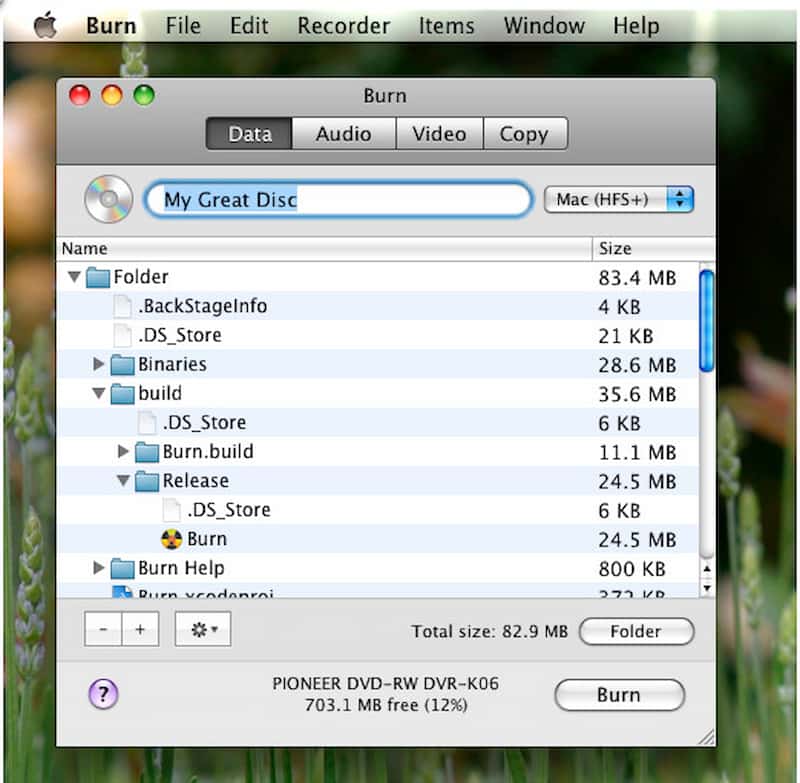
• Completely free to use.
• Supports burning video and audio media files of popular formats to DVD/CD discs with original quality.
• Offers a friendly UI for new users to get started quickly.
• Ensures quick burning speed to save time and improve efficiency.
Remark:
For me, this Mac burning tool can meet my simple need, like a MP4 file to a playable DVD. But most reviews of Burn had been polarizing: some people reported that it worked beautifully in Lion (10.7.3) on a MacBook Pro. Others blamed that burned DVDs won't work in any DVD player. (Refers to SourceForge)
Q: Is a DVD burner the same as a CD burner?
A: No, they are different. Check the differences below:
• Storage format: CDs use audio formats, but DVDs support audio, video, and text formats.
• Available storage: Normally, the largest capacity of CDs is only 700MB, while DVDs range from 4.7GB to 8.5GB.
• Playback ability: DVDs are mostly equipped with playback and double-sided recording, while CDs don’t have these functions.
Q: What should I pay attention to when selecting the best DVD burner?
A: Compatibility, quality, and burning speed.
• Compatibility: When the DVD burner supports more video formats and disc types, the success rate can also be improved.
• Quality If DVD burners maintain lossless high-definition, like 4K, when burning DVDs, they are better options to consider.
• Burning speed: Selecting DVD burning software with acceleration can definitely improve your efficiency.
Overall, among these 11 best DVD burners, VideoByte DVD Creator meets all these requirements, making it the most attractive and widely selected option for burning DVDs on Windows/Mac. You can install the program for free to try from today!
When selecting the best DVD burning software, we should consider its compatibility, as we want to create DVDs of various types and import videos in different formats. Also, other factors such as output quality, an easy-to-use interface, and stable, fast in-app performance should be considered. Now, based on these and compare to selecting the top pick for creating DVDs! Among all, VideoByte DVD Creator remains our top choice for its excellent features and user experience.
Hot Articles
by in 7 February, 2025
by in 7 February, 2025

 English
  Korean
  Dutch
Dutch  Chinese
  Italian
  Spanish