





The Only Ripper to Support Both DVD & Blu-ray
Forward this article:



To ensure a reliable and up-to-date review, we have tried over 20 Mac Blu-ray ripping tools between March and April 2026. Below is the specific testing environment used for our benchmarks:
(Note: Most Blu-ray rippers are strictly for personal backup and use. We do not encourage the unauthorized distribution of copyrighted disc contents.)
Blu-rays are still popular for their cinema-like movie streaming experience at home for everyone. However, it seems difficult for Mac users to play Blu-ray Discs directly since Mac computers are not equipped with a Blu-ray drive. Worse yet, you may notice that Mac won't offer built-in features to support smooth Blu-ray playback.
Instead of looking for an external drive to play Blu-ray discs on a Mac, why not directly use a Mac Blu-ray ripper to rip them to digital copies for flexible viewing? This article presents the 8 best Blu-ray rippers for Mac, designed to rip protected Blu-ray discs while maintaining lossless quality and bypassing region codes, helping you play any Blu-rays on Mac without hassle!
For All-round Blu-ray ripping (Primary choice): VideoByte BD-DVD Ripper
For Ripping Speed: DVDFab Blu-ray Ripper.
For free: Choose HandBrake or VLC if you don't mind a learning curve.
Decryption Capability
The good Blu-ray ripper must own the ability to bypass AACS 2.1, BD+, and Cinavia. A top-tier ripper must handle the latest DRM protections without requiring third-party plugins.
Hardware Acceleration
If you want get a perfect ripping performance on a Mac computer, the tool need have a native optimization for M1-M4 Apple Silicon. We prioritize software that leverages the Media Engine (ProRes/AV1) of the M-series chips to reduce CPU load and cut ripping time under 40 minutes.
Lossless Audio & Video Quality
The ripper program supports 1:1 lossless output for 4K HDR and Dolby Atmos. It must support MKV Lossless output to ensure that 4K HDR10+ metadata and object-based audio tracks remain untouched.
Error Correction & Disc Stability
Some old Blu-ray discs may be scratched lightly. The software must have a robust scanning engine that can recover data from physical sectors where standard players might fail or freeze.
Best For: Rip homemade/commercial Blu-ray discs on Mac with lossless quality and fast speed. Supported OS: Windows 11/10/8.1/8/7 (32-bit/64-bit) and macOS 10.12 or above
• Easy-to-Use: ⭐⭐⭐⭐⭐
• Supported OS: Windows 11/10/8.1/8/7 (32-bit/64-bit) and macOS 10.12 or above
• Input Formats: Homemade and commercial Blu-ray/DVD discs, folders, ISO files.
• Output Formats: Lossless ISO files and folders, 300+ video and audio formats.
• Handle Copy Protection: All protections, including AACS, BD+, Cinavia, ROM Mark, and region codes.
• Price: $69.95/Year, $84.95/Single License
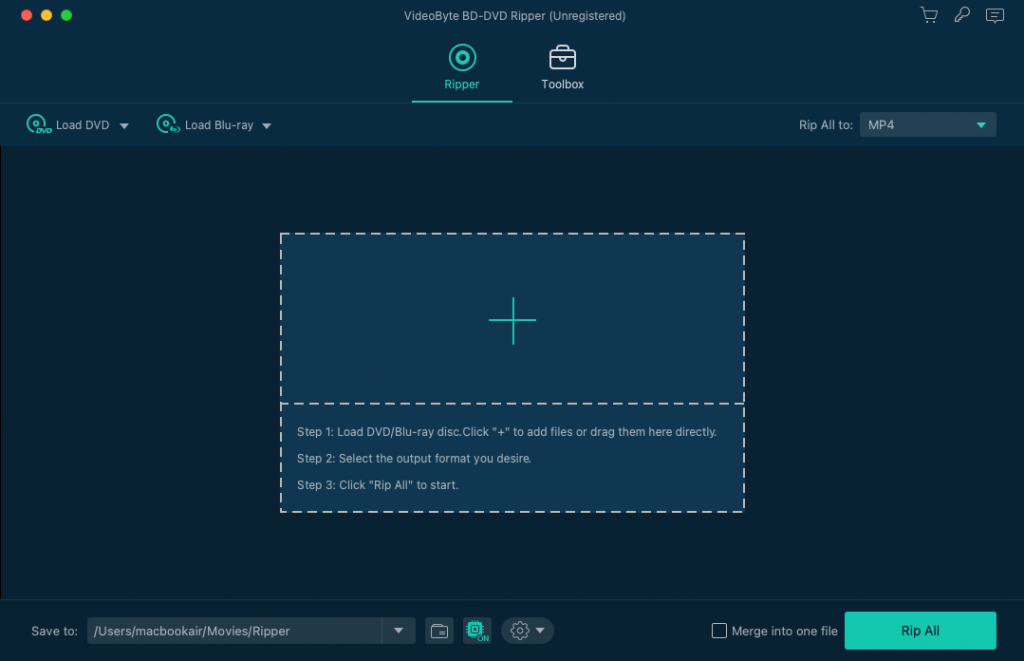
VideoByte BD-DVD Ripper earns a spot as the best Blu-ray decrypter on both Mac and Windows due to its professional functionality in decrypting Blu-ray discs or folders and outputting 4K Blu-ray videos losslessly. It can also automatically remove any type of protection or region codes of Blu-ray/DVD discs.
• Capable of ripping both protected and unprotected Blu-rays on Mac & Windows.
• Support lossless quality video outputs.
• Preserve all subtitles & audio tracks.
• Offer GPU acceleration service.
• Built-in video editor equipped.
As the Mac Blu-ray ripper offers over 300 output formats and a series of device models, you can export Blu-ray videos to ensure their playback on all devices. VideoByte BD-DVD Ripper also allows you to adjust video profiles with optimal parameter settings like encoders, frame rate, bitrate, and more after converting Blu-ray to digital files on Mac.
Additionally, this top Blu-ray ripper for Mac and also features editing capabilities, including trimming, picture polishing, merging, and adding external subtitles/audio tracks. Not only that, VideoByte Blu-ray Ripper also provides a free trial, which allows new users to enjoy all the features before subscribing. This feature makes it highly competitive when compared with other paid Mac Blu-ray rippers.
 Pros
Pros
 Cons
Cons
Feedback
Rating from Trustpilot: 4.3/5
I am able to rip Blu-rays and DVDs into hundreds of different formats. I can even back up the original ISO! If a format doesn't work for one device, I can take that file and easily turn it into another without needing to re-rip from the disk. - Eli Carter, Jan 15, 2026
VideoByte is one of the best Blu-ray ripping software we tested, which actually took 40 minutes to rip a Blu-ray disc, Oppenheimer (about 78GB of data), on a Mac and generate it to a 1:1 lossless MKV file. It's fast compared to many free Blu-ray rippers on Mac, and smoothly deals with the protection (AACS 2.1) at a time, providing a flawless disc digital backup process.
Best For: Easily convert MKV files with the Mac Blu-ray ripper.
• Easy-to-Use: ⭐⭐⭐
• Supported OS: Windows XP or later, x86 or x64, x64 or ARM64 Mac OS X 10.7 or later, Linux
• Input Formats: Blu-ray/DVD discs
• Output Formats: MKV only.
• Handle Copy Protection: Only support AACS and BD+.
• Price: Free on BETA
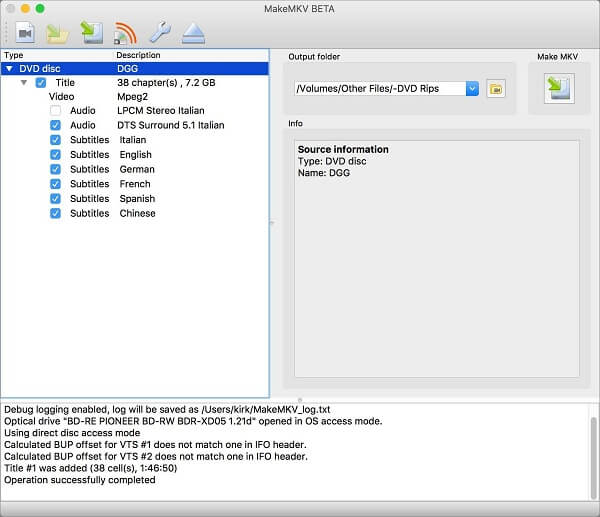
MakeMKV is a free Blu-ray ripper for Mac that allows you to rip without compressing the video quality. But it only rips Blu-ray to MKV, so for users wanting to rip Blu-ray to other formats like MP4 on Mac, MakeMKV can’t help you. Also, keep in mind that MakeMKV rips DVDs for free, but its Blu-ray ripping requires a paid subscription after the 30-day free trial.
• Maintains original lossless quality to rip Blu-ray to MKV.
• Free BETA support and easy to use.
• Supports ripping certain encrypted Blu-ray discs on Mac.
Another downside of MakeMKV is that it takes up too much space. The ripped Blu-ray content will occupy the same amount of space as the Blu-ray disc does. Normally, the file size would be at least 20GB to 50GB, and thus it’s a huge burden on your hard disc space. Moreover, it will take a much longer time to complete the ripping process. MakeMKV does not include many advanced editing features, so anyone who is not so well-versed in Blu-ray ripping lingo can also quickly operate on its interface. If you prioritize faster download speeds and additional editing tools when searching for the best Mac Blu-ray ripper, a more professional alternative to MakeMKV, such as VideoByte BD-DVD Ripper, should be considered.
Pros
Cons
Feedback
Rating from Trustpilot: 3.7/5
The developer doesn't keep the software decryption keys updated frequently, which means you can't convert your newer video files quickly. – Fenton, Oct 16, 2023
MakeMKV can also be VERY picky about even the slightest flaw on a disk. I've had to send a few purchases back to Amazon for replacement since they had very minor errors that would crash MakeMKV… – AshleyUncia from Reddit.
Best For:The best free solution for unprotected Blu-ray conversion.
• Easy-to-Use: ⭐⭐⭐
• Supported OS: Windows 10 or later, macOS 10.13 or later, Linux.
• Input Formats: Blu-ray/DVD discs, MP4 or M4V, MKV, MOV, MPG or MPEG, AVI, and WMV.
• Output Formats: MP4, M4V, MKV, AAC, MP3.
• Handle Copy Protection: No.
• Price: Free.
• Provides flexible parameter customization settings.
• Detects full chapter information to selectively rip Blu-rays.
• Keeps original audio tracks and subtitles for ripped Blu-ray movies.
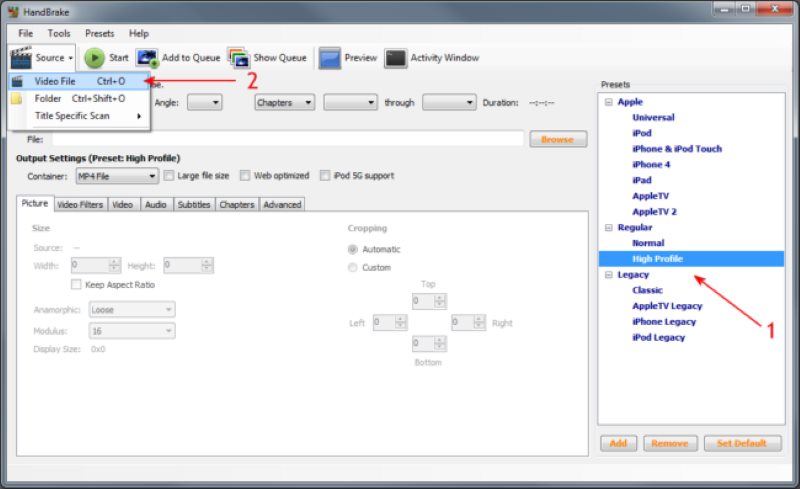
As another Mac Blu-ray ripper, HandBrake aims to help both computer first-timers and experts handle regular media format conversion and Blu-ray ripping effortlessly. It may not be the simplest ripping tool nor the most versatile solution to process Blu-ray backup on Mac. Yet, it remains an enticing cross-platform video transcoder providing all the basic features to rip unprotected DVD/Blu-ray into videos of H.264, MPEG-4, and other codecs.
Feedback
Rating from Trustpilot: 3.4/5
"… you'll need better hardware to go faster. I have a 5900x, and it takes about an hour to compress a Blu-ray in HandBrake." – Ragin Hindu from Reddit.
"HandBrake alone won't get past most Blu-ray protection, even with libdvdcss." - AlternativeDebate790 from Reddit.
HandBrake remains good at ripping Blu-ray discs on Mac with vast custom presets, but it frequently struggles with commercial Blu-rays. To handle the latest encryptions, we have to manually install and update third-party plugins.
Pros
Cons
Best For: Fast ripping and cracking of Blu-ray discs.
• Easy-to-Use: ⭐⭐⭐
• Supported OS: Windows 11/10/8.1/8/7 (64 bit) or macOS 10.13 - 15.x.
• Input Formats: Blu-ray discs, folders, ISO files.
• Output Formats: 300+ video/audio formats.
• Handle Copy Protection: All protections, including AACS, BD+, Cinavia, ROM Mark, and region codes.
• Price: $69.99 (1-year), $99.99 (lifetime).
• Handle most of the copy protections.
• 300+ formats and high definitions retained to export Blu-ray videos.
• Fast ripping speed.
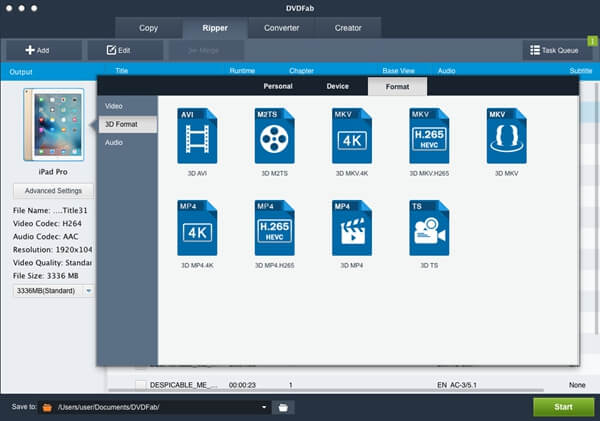
DVDFab Blu-ray Ripper excels in ripping any commercial Blu-ray movies, easily circumventing all known AACS copy protections, including the newest MKB v26 and bus encryption, Region Code, BD-Live, and UOPs. Additionally, it highlights its fast conversion speed due to its multi-core CPU support. This makes it a piece of cake for Mac DVDFab Blu-ray Ripper to rip multiple files simultaneously of different titles. Plus, it also claims to maintain the original quality of the ripped Blu-rays.
Pros
Cons
Feedback
Rating from Capterra: 3.8/5
"I bought the 1960's Batman TV shows Blu-Ray, and I wanted to rip them for playing on my tablet…DVDFab crashed not once but twice - both after about 5 minutes of setting itself up…" - Tom from Trustpilot.
"The two features I like the most are the AI upscaling profile, which allows you to rip Blu-ray discs and upscale them to a 4K HDR10 movie, and the UHD ripper and creator. If the price had been much lower…" - THOR ERIC VÅGEN JÆGTNES from Trustpilot
Shared with similar features, DVDFab requires a higher price to activate full functions. If you have a limited budget, VideoByte BD-DVD Ripper is a reliable alternative.
Best For: Seeking a moderate Blu-ray ripping software on Mac.
• Easy-to-Use: ⭐⭐⭐⭐
• Supported OS: macOS High Sierra (10.13) / Mojave (10.14) / Catalina (10.15) / Big Sur (11) / Monterey (12) / Ventura (13) / Sonoma (14) / Sequoia (15) / Tahoe (26)
• Input Formats: Blu-ray/DVDs, folders, ISO files.
• Output Formats: 180+ video/audio formats.
• Handle Copy Protection: Most protection types, including AACS, BD+, and region codes.
• Price: $44.95 (1-year), $99.95 (lifetime).
• Works for both 2D and 3D Blu-ray ripping.
• Over 180 digital formats supported.
• Keeps the best 4K quality and original audio effects.
• Supports batch conversion to speed up Blu-ray ripping.
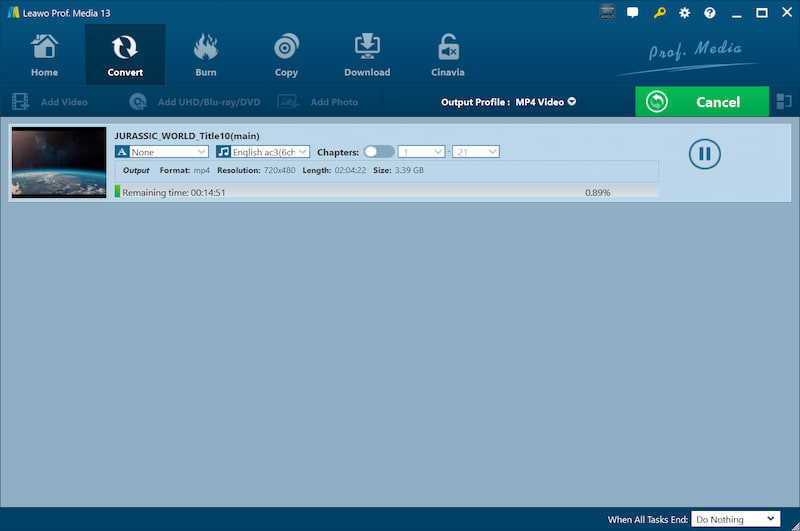
Leawo Blu-ray Ripper is another trustworthy Mac Blu-ray ripper, featuring a powerful Blu-ray backup function to convert 2D/3D Blu-ray/DVD to over 180 video formats playable on common digital devices. It is equally powerful in removing region codes and copy protection for Mac users, including AACS encryption, BD+, and the latest MKB technology, as well as CSS-encrypted DVD discs.
However, it is unable to convert Blu-ray into MKV files without compromising quality, unlike VideoByte BD-DVD Ripper, which can deliver lossless outputs after the conversion. What’s worse, its conversion speed is not as fast as it officially claims. Plus, the options for customizing the output profile might be more limited than initially expected. But still, the wide range of output formats and decent ripping quality both ensure that the Leawo Blu-ray Ripper is a considerate Blu-ray ripper for Mac users to try. You can experience its free trial before making a purchase.
Pros
Cons
Feedback
Rating from Trustpilot: 3.6/5
"I bought Leawo's Blu-ray/DVD Ripper and have successfully been able to rip some commercial Blu-ray and DVD disks (that I own); however, now certain movies, only half the movie rips." Canoemtp from Reddit
Best For: 1:1 copy and rip any Blu-ray to regular formats.
• Easy-to-Use: ⭐⭐⭐⭐
• Supported OS: 64-bit OS | macOS 26 Tahoe & Apple M-series compatible
• Input Formats: Blu-ray/DVDs, folders, ISO files.
• Output Formats: 500+ video/audio formats.
• Handle Copy Protection: Most of the protections, including AACS, BD+, BD-J, and Cinavia.
• Price: $27.95/Year, $42.95/Lifetime License
• Support 5K & 8K lossless output.
• Over 180 digital formats supported.
• Allow 3D Blu-ray ripping.
• Offer multiple editing features.
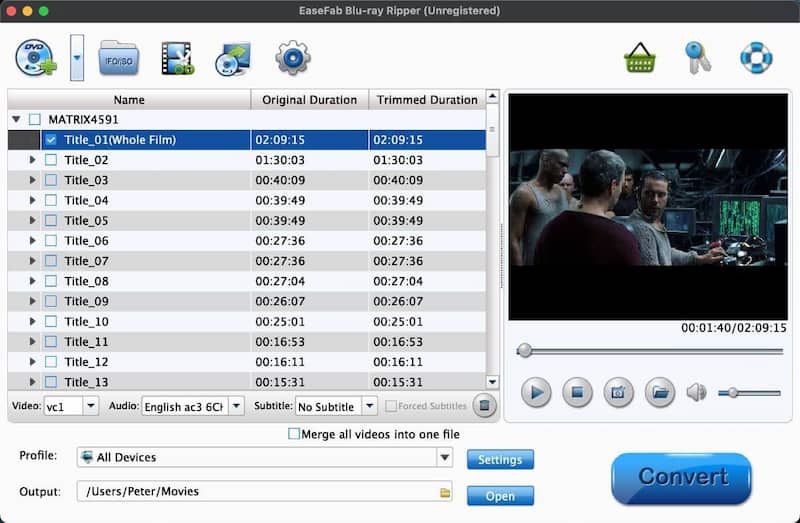
The next best Blu-ray ripper for Mac we want to introduce is EaseFab Blu-ray Ripper. It’s a full-featured Mac Blu-ray ripper that supports ripping encrypted Blu-rays & ISO files (DVDs are also supported) to over 500 common video/audio formats, which are well-compatible with most devices, including iPad, iPhone, etc. What’s more, this best Blu-ray ripper for Mac provides high-definition output, including 4K, 5K, and even 8K videos, ensuring the best Blu-ray playback experience for you.
Pros
Cons
However, EaseFab might not be the best choice for everyone due to its cumbersome interface and a 3-minute free trial, which may not be sufficient to test all features. Additionally, some users have also reported difficulties ripping Blu-rays to the MP4 format and slower conversion speeds. While it provides you with Blu-ray ripping options on Mac, its performance may not be competitive compared to other professional Mac Blu-ray rippers.
Feedback
Rating from Trustpilot: 4.5/5
"I'm trying to convert my 3D Blu-rays into a digital format (preferably SBS MP4 so I can watch my library in VR). I've got a 3D compatible BD USB drive and…Easefab Blu Ray Rippers… rips a beautiful SBS image that works fine except it is NOT in 3D." – user review from AVSFORUM.
 Note
Note
If you have ever encountered problems above when using EaseFab, then you may want to try VideoByte BD-DVD Ripper, which will not let you down. This Mac Blu-ray ripper offers a more efficient, stable, and user-friendly alternative to help you easily back up Blu-rays to your Mac.
Best For: Convert 4K Blu-ray/DVD to a variety of formats with a full-featured Blu-ray Ripper software.
• Easy-to-Use: ⭐⭐⭐
• Supported OS: Mac OS X Snow Leopard, Lion, Mountain Lion, Mavericks, Yosemite, El Capitan, macOS Sierra, High Sierra, Mojave, Catalina, Big Sur, Monterey, Ventura, Sonoma, macOS Sequoia, macOS 26 Tahoe or higher.
• Input Formats: Blu-ray/DVDs, folders, ISO files.
• Output Formats: 400+ video/audio formats.
• Handle Copy Protection: Most of the protections, including AACS, BD+, BD-J, Region Code, and Cinavia.
• Price: $29.95 (1-year), $45.95 (lifetime).
• Convert any Blu-rays into a lossless MKV file.
• Provide more advanced features for Blu-ray ripping.
• Offer fast conversions with GPU Hardware acceleration.
• Support Mac M1, M2, M3, M4, M4 Max, M4 Pro and M5 chips.
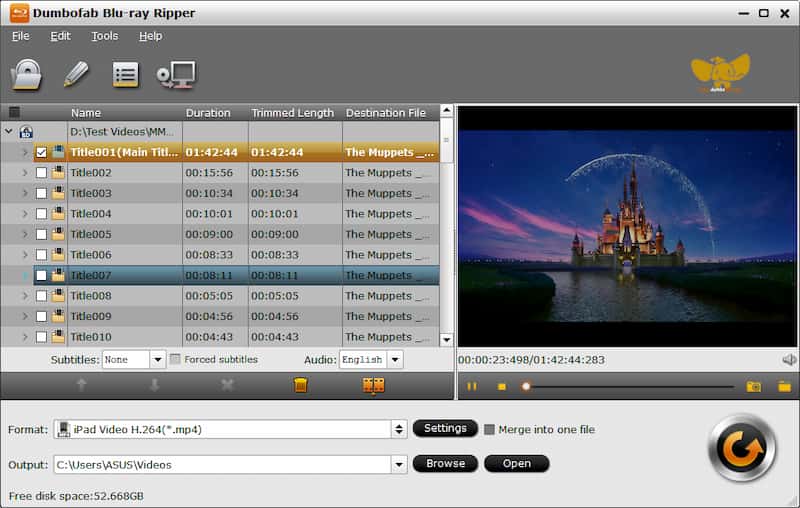
DumboFab Blu-ray Ripper for Mac is another powerful Mac Blu-ray ripping software that can rip all content of a Blu-ray. It can efficiently remove copy protection and quickly convert Blu-ray discs to over 400 video and audio formats, including MKV, MP4, etc., for playback on Mac computers or other devices. Not only that, it can also copy Blu-rays at a 1:1 ratio for original-quality Blu-ray videos.
Pros
Cons
However, users new to the software may find the interface and features rather complex. Additionally, some users have reported occasional conversion failures with specific Blu-ray discs. Overall, DumboFab Blu-ray Ripper is a powerful and efficient Mac Blu-ray ripper. But don’t forget to consider exploring alternatives if ease of use and high success rates are your top priorities.
Feedback
Rating from Trustpilot: 4.0/5
On MacBook Pro M3 Max, DumboFab doesn't seem to fully leverage the M3's native AV1 hardware acceleration, resulting in a significantly longer wait time (about 52 minutes for a full 1:1 Blu-ray disc ripping). Overall, it's reliable and steady for difficult discs. Still, it feels sluggish for users looking for a modern workflow on the latest Apple Silicon.
Best For: Free to rip a homemade or unprotected Blu-ray on Mac.
• Easy-to-Use: ⭐⭐
• Supported OS: Windows XP SP3 or later & MacOS X 10.7.5 or later, Linux
• Input Formats: Blu-ray (file installed needed), DVD Video, Video CD / VCD, SVCD, Audio CD (no DTS-CD), and 50+ common media formats.
• Output Formats: MPEG, AVI, ASF / WMV / WMA, MP4 / MOV / 3GP, OGG / OGM / Annodex, Matroska (MKV), Real, WAV (including DTS), Raw.
• Audio: DTS, AAC, AC3/A52, Raw DV, FLAC, FLV (Flash), MXF, Nut, Standard MIDI / SMF, Creative™ Voice.
• Handle Copy Protection: NO.
• Price: Free.
• Offers completely free ripping services.
• Supports popular video/audio formats for output.
• Keeps full chapter information to rip with Blu-rays.
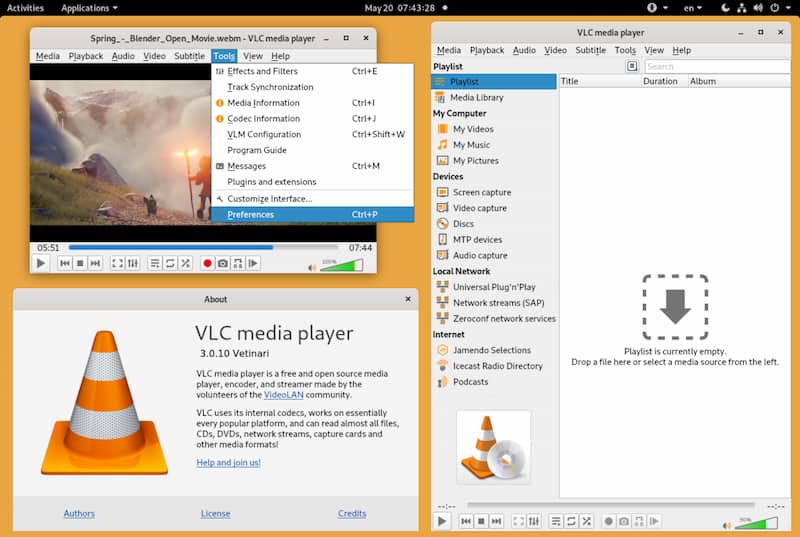
Although it is well-known as a media player, VLC Media Player also offers a free, easy-to-use and efficient built-in Blu-ray ripper for Mac, Windows, and Linux users to rip Blu-rays without any cost. Originally, VLC won’t support ripping protected content for you. If you always have to use VLC to break the DRM, you can figure out how to use the libdvdcss module that is available at VLC's site. By getting this file installed, you can easily rip protected Blu-rays on Mac.
Pros
Cons
However, compared to professional Blu-ray rippers for Mac like VideoByte BD-DVD Ripper, VLC only offers very basic ripping capabilities, without additional parameter settings or acceleration technologies being applied. However, its easy-to-use function and good output quality still make it a popular Mac Blu-ray ripper for many users who want to save money. But for processing more advanced features like lossless and quick Blu-ray ripping, you still need a VLC alternative to do it professionally.
Feedback
Rating from Trustpilot: 3.7/5
"I'm trying to rip my copy of Your Name to MP4 with Blu-ray, but whenever I manage to rip it, it's always in English with no subtitles…I tried to rip it to a .MKV file, but it only gets the warning at the beginning of the disk and ignores the rest of the film."
"…with that method, it looked like it had to play the DVD in real time, with my volume on. In other words, while it was ripping, if I was at my Mac, I had to listen to the entire DVD I wanted to rip."
(from the VLC community on Reddit)
Note
VLC may not maintain the original image quality. Moreover, we found in our testing that it frequently failed when ripping Blu-rays. For users who prioritize lossless image quality and stable performance, an alternative Blu-ray ripper for Mac, like VideoByte BD-DVD Ripper, may be a better option.
| Tool | Remove Copy Protection | Output Formats | Quality | Speed | Easy-to-Use | Price |
|---|---|---|---|---|---|---|
| VideoByte BD-DVD Ripper | APS, CSS, ARccOS, CPRM, AACS, BD+, Cinavias and Region Codes | 300+ | 4K | 6x | ⭐⭐⭐⭐⭐ | $69.95/Year $84.95/Single License |
| MakeMKV | AACS, BD+ | Only MKV | 1:1 copy | Medium | ⭐⭐⭐ | Free |
| HandBrake | ❌️ | MP4, MKV, and WebM | Up to 1080p | Medium | ⭐⭐⭐ | Free |
| DVDFab Blu-ray Ripper for Mac | AACS, BD+, BD-J, Region Code, Country Code | 1000+ | 4K | 50x | ⭐⭐⭐⭐ | $69.99/Year $99.99/Lifetime |
| Leawo Blu-ray Ripper for Mac | AACS, BD+, MKB, and CSS-DVD | 180+ | 4K | 6x | ⭐⭐⭐⭐ | $44.95/Year $99.95/Lifetime |
| EaseFab Blu-ray Ripper for Mac | AACS, BD+, BD-J, RC, Country Code, MKB, Cinavia, etc. | 500+ | 4K | 30x | ⭐⭐⭐⭐ | $27.95/Year $42.95/Lifetime |
| DumboFab Blu-ray Ripper for Mac | AACS, BD+, BD-J, and region codes | MP4, MKV, AVI, MOV, WMV, FLV, WebM, TS, etc. | 4K | 30x | ⭐⭐⭐ | $44.95/Year, $99.95/Lifetime |
| VLC Media Player | ❌️ (not supported originally) | 19 | Medium | ⭐⭐ | Free |
Q: How to rip Blu-ray to Mac easily?
A: You can smoothly rip Blu-ray on Mac with the 8 best Blu-ray rippers for Mac we mentioned above, but you may also notice that some Mac Blu-ray ripping freeware, like VLC and HandBrake, is somehow complicated for some of you, especially when you are beginners. Therefore, to improve your Mac Blu-ray ripping experience, the all-in-one Mac Blu-ray Ripper, VideoByte BD-DVD Ripper, will be a reliable choice.
Q: How can you watch Blu-ray on a Mac?
A: Mac OS doesn’t support Blu-ray playback natively, so you need an external USB Blu-ray drive and Blu-ray playback software if you want to watch Blu-ray discs on a Mac. Although the process might seem a bit complicated, you can find detailed information on How to Play Blu-ray Movies on a MacBook.
Q: What is the best format to rip Blu-rays?
A: This would be based on your needs. If you want to make Blu-ray videos playable on more devices and media players, the best option is to rip Blu-ray to MP4. If you need to keep Blu-ray videos in lossless quality, MKV would be a better option, as it is an uncompressed format that preserves videos without any loss.
Q: How long does a Mac Blu-ray ripper work for a 50GB Blu-ray disc?
A: It depends on the size of the disc and the software you choose. If the ripper is powerful enough, like VideoByte BD-DVD Ripper, equipped with multiple acceleration technologies to speed up the ripping process, it only takes 30-40 minutes to finish the task. However, for many free Blu-ray rippers for Mac, their ripping operations are not accelerated, resulting in hours-long ripping times.
To sum up, after taking into consideration the ease of use, conversion speed, output quality, bonus features, as well as costs, VideoByte BD-DVD Ripper should be your priority choice. Moreover, a free trial is available, empowering you to get through all the features of this best Blu-ray ripper for Mac, including its fast conversion speed, excellent lossless quality output, powerful Blu-ray/DVD ripping features, and more. Let’s feel free to give it a try!
Hot Articles
by in 25 July, 2025
by in 25 July, 2025
by in 22 August, 2025

 English
  Korean
  Dutch
Dutch  Chinese
  Italian
  Spanish