




 Lafanda
 16 March, 2026
Rip Blu-ray/DVD
16 March, 2026
Rip Blu-ray/DVD

The Only Ripper to Support Both DVD & Blu-ray
Forward this article:



VideoByte BD-DVD Ripper: Best overall for rapid decryption and all-in-one format conversion.
WonderFox DVD Ripper Pro: Top choice for handling protected DVD to more formats.
HandBrake: The best completely free, open-source tool for versatile transcoding without decryption.
The best DVD ripping software makes it easy to rip your DVDs into digital files and back them up on your computer for flexible streaming and watching, and you never need an additional drive. Among various DVD Rippers, which one is worth trying?
Here, we list and compare the 10 best free DVD rippers for Windows & Mac to help you choose the right fit. Most of them are not totally free, but you can at least get a free trial to test if it meets your needs. Let’s get started!
To obtain objective results, we test each DVD ripper application in a laboratory and actual real-world playback scenarios. We use common commercial DVDs, Blu-ray discs, and ISO images to test their performance, with an emphasis on video quality, audio sync, subtitle rendering, hardware acceleration, and disc menus.
| Best for | Quickly ripping all types of protected and homemade DVD/Blu-ray discs without quality loss. |
| Pricing | Free trial provided (1 Year Subscription: $69.95/Single License: $84.95) |
| Supported OS | Windows 11/10/8.1/8/7/XP, Mac OS X 10.11 or higher. |
| Ratings | 4.3/5 from Trustpilot |
 Pros
Pros
 Cons
Cons
VideoByte BD-DVD Ripper is one of the best DVD rippers that can convert commercial or homemade DVDs/Blu-ray discs/folders/ISO files to 300+ digital formats, such as MP4, MKV, MOV, FLV, and M4V, helping you back up your collections.
You don’t need to worry about copy protection like AACS, Cinavia, APS, and CSS, because it can easily decrypt them and successfully rip DVDs to regular digital files for you. Besides, it will provide a fast-ripping speed and maintain the best quality condition (1080p HD & 4K) to ensure an enjoyable offline viewing experience. With its intuitive guide, you can access other helpful functions such as video compression, helping users get a smaller file and saving more space.
Bypasses all encryption and region codes torip commercial DVDs to popular media files without hassle.
Helps to keep all the subtitles and audio tracks, and even allows you to add external ones.
Enable the DVD discs to be played on different popular devices such as Apple, Samsung, Sony, Huawei, and more.
Offers a free parameter settings function to edit your DVD collection.
Provides 6X faster-ripping speed tomake ripping fast and easy.
Supports converting 2D to 3D with easy clicks.
How to rip a DVD using VideoByte BD-DVD Ripper? You can watch the video at the top of the page or follow the steps below:
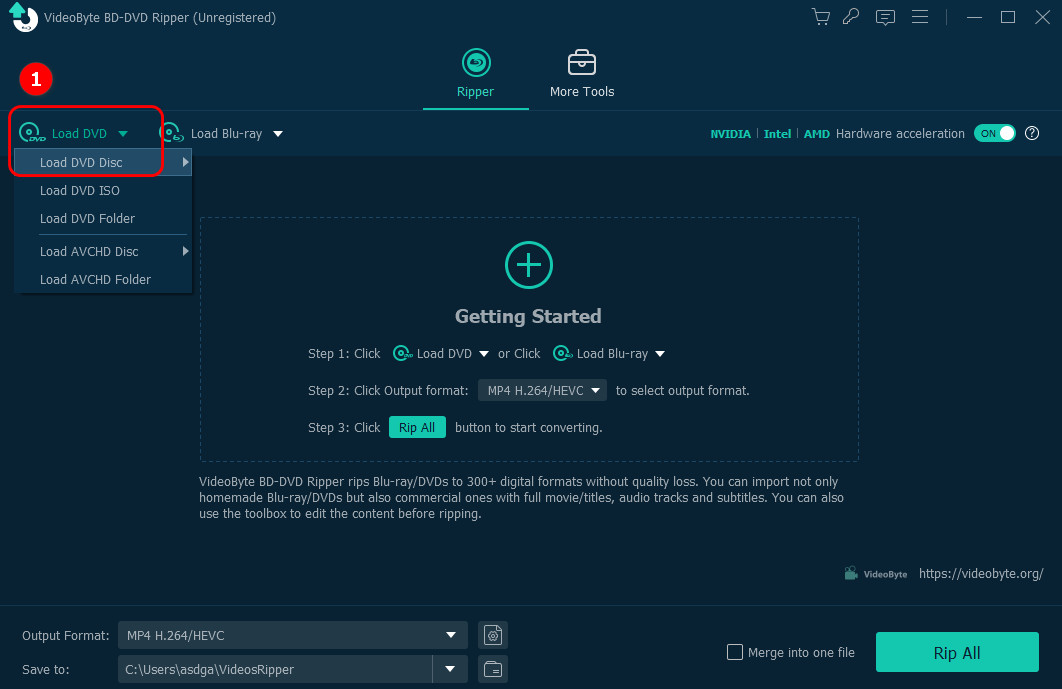
Step 1. Insert your DVD disc into a drive on your computer. Open the software and click Load DVD > Load DVD Disc.
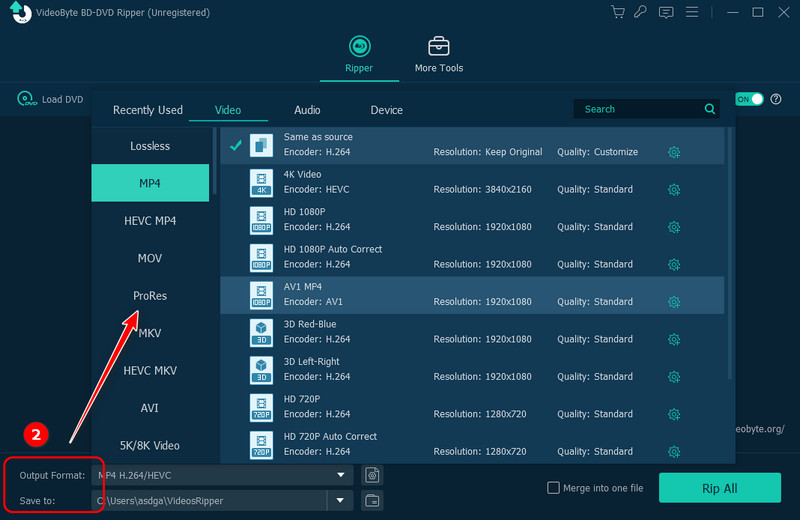
Step 2. Choose preferred output format and destination folder.
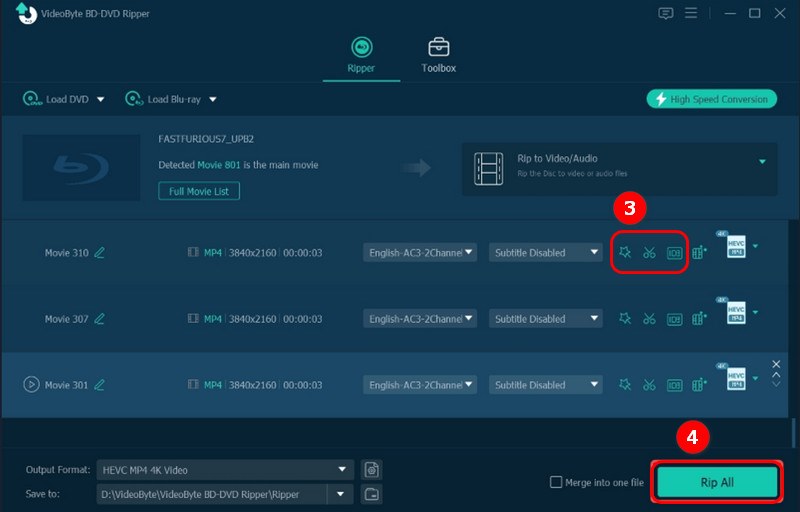
Step 3. Then you can tab a scissor icon and a magic wand icon to clip, edit, or add effects to the video. After finishing, click Rip All to convert the DVD disc.
User Review
“I am able to rip Blue Ray and DVD's into hundreds of different formats. I can even back up the original ISO! If a format doesn't work for one device, I can take that file and easily turn it into another without needed to re-rip from the disk.” - From Trustpilot
| Best for | Rip a batch of copy-protected movies in a short time |
| Pricing | Free trial provided (1-Year License: $59.99/ Lifetime License: $59.49/Lifetime DVDFab DVD Full Suite: $146.99) |
| Supported OS | Windows 10 and later, macOS 10.13 and later, and Linux |
| Ratings | 4.3/5 from SourceForge |
Pros
Cons
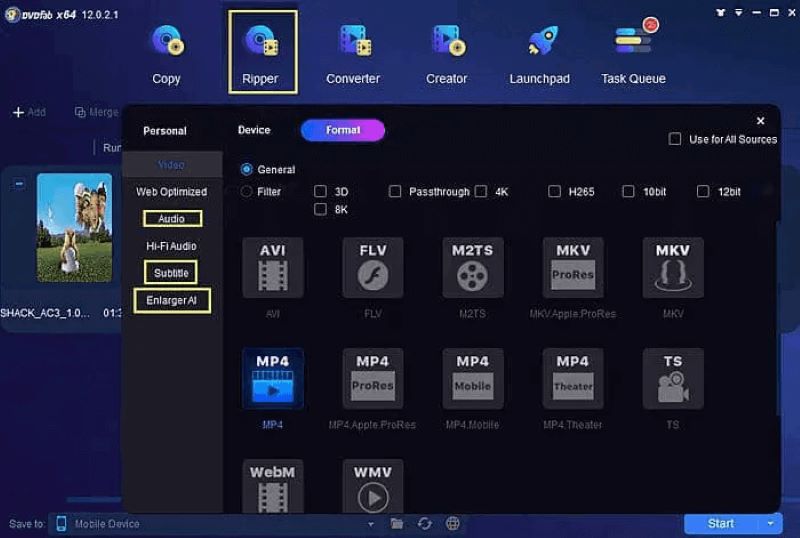
DVDFab DVD Ripper provides great features to help rip protected and homemade DVDs to common video formats, such as MP4, MKV, AVI, and more. Also, it comes with many editing features, allowing for video trimming and merging, watermark removal, etc. With it, you can rip DVDs to a hard drive at 50× faster speed without any limitation.
However, if you are searching for a free DVD converter that supports 4K playback, the free version of DVDFab may not be ideal, as the free DVD ripper only supports ripping DVDs to the highest 480P resolution at maximum. But its AI enhancement service (paid) can upscale video quality from 480p to even 1080p so that the videos can be enjoyed on a larger screen with better visual effects.
User Review
“The user interface is a bit on the complicated side. I've ripped over 1000 DVDs and BluRays with less than 20 it couldn't handle for some reason. I both back up my disks to .iso files and also rip the main movie to a library for my multimedia system.” - From Trustpilot
| Best for | Users who don't mind third-party libraries (libdvdcss) for encryption. |
| Pricing | Free |
| Supported OS | Windows 10 and later, macOS 10.13 and later, and Linux |
| Ratings | 4/5 from SourceForge |
Pros
Cons
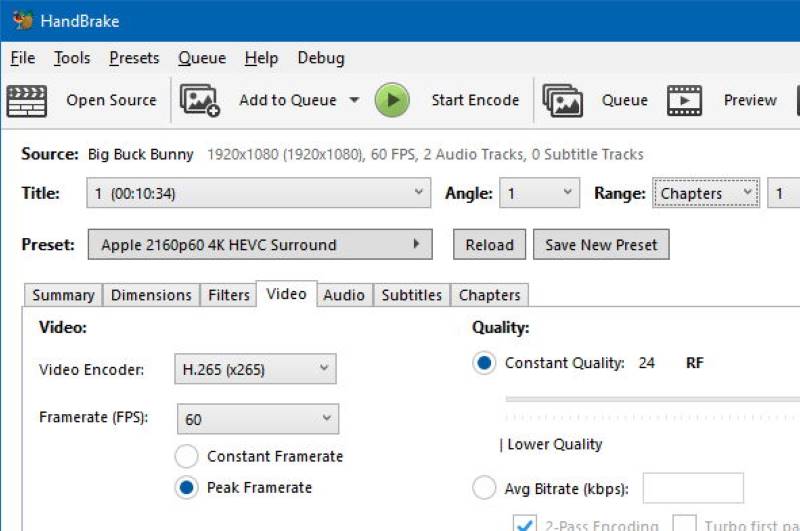
Handbrake is one of the most well-known and best free DVD rippers you should not miss. This open-source DVD ripping software supports converting common video, ripping DVDs to MP4 or some popular formats and batch processing, which helps you back up your favorite DVDs. No matter if you are using Windows 11/10, Mac, or Linux, HandBrake is compatible with them and offers smooth in-app performance to help you rip DVDs without hassle.
This free DVD ripper comes with a price – it can’t remove DVDs encrypted with copy protection or region codes. Besides, when using this DVD ripper, errors can occur as it lacks tech support.
User Review
“Has a lot of settings that might be a bit confusing…It does a great job of conversion and compression.” - From Trustpilot
“Finding the programme a bit hit & miss…I've had to redo about a quarter of those that I've transfered so far, can't complain for a free programme though.” - From Trustpilot
| Best for | Converting copy-protected DVDs/Blu-rays to MKV format only. |
| Pricing | Free |
| Supported OS | Windows 11/10/8.1/8/7 (64 bit), macOS 10.13-15.x |
| Ratings | 3.7/5 from Trustpilot |
Pros
Cons
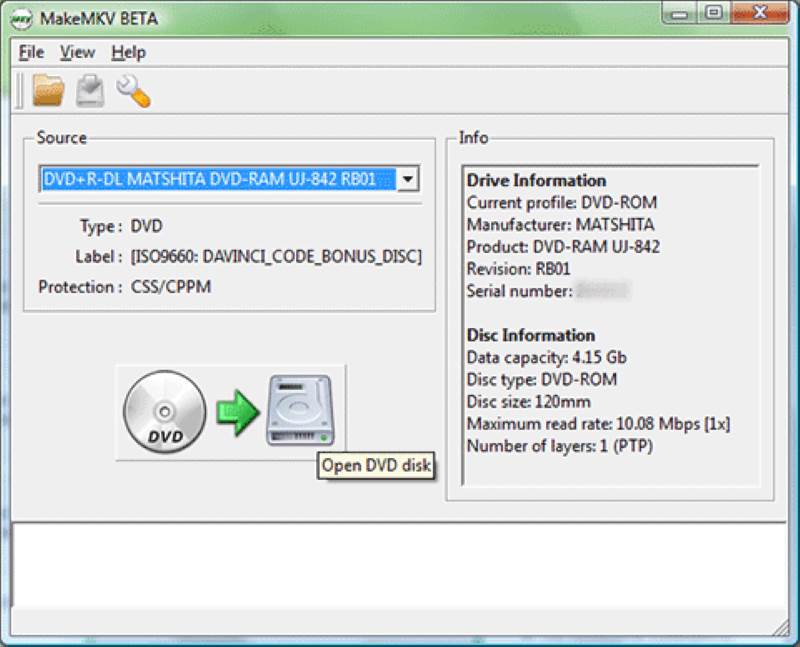
MakeMKV is free DVD ripping software for Windows, Mac, and Linux that can rip your personal DVDs to the MKV format. Apart from the DVDs, it can also read Blu-ray discs protected by the latest versions of AACS and BD+. MakeMKV will preserve all video and audio tracks, chapters, and metadata after conversion. However, as there are no parameters customized settings or built-in editing functions, you can’t edit your videos before outputting them. And some users complain that it cannot compress the ripped file, which will take up much storage space on their computers.
User Review
“The developer doesn’t keep the software decryption keys updated frequently which means you can’t convert your newer video files quickly.” - From Trustpilot
To know more about MKV alternatives, you can check MakeMKV alternatives for Windows/Mac.
| Best for | Ripping DVDs encrypted with common protection. |
| Pricing | Free trial provided (Lifetime Single License: $29.95/Family License (3 PCs): $69.95) |
| Supported OS | Windows 11/10/8/7 and lower. |
| Ratings | 4.3/5 from softonic |
Pros
Cons
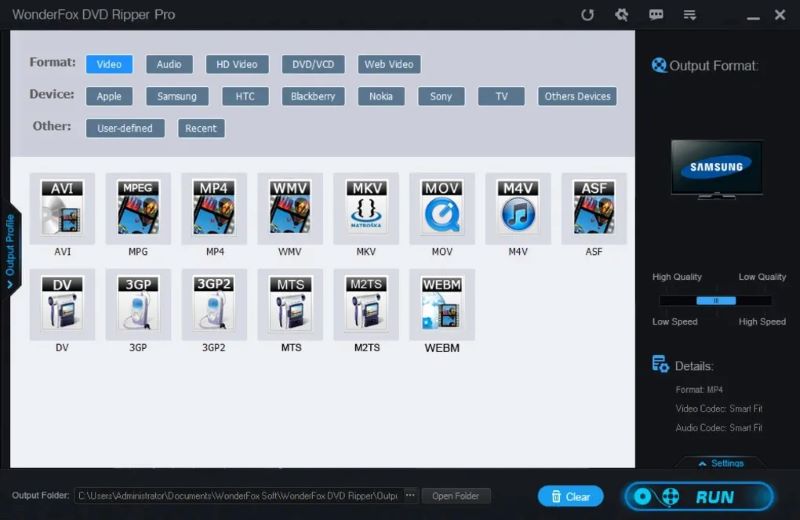
With the 15-minute free DVD ripping trial provided, you can try WonderFox DVD Ripper on Windows 11/10 to rip copy-protected DVDs to common video with high quality. It can bypass most copy protection, like DVD CSS, Region Code, RCE, and Sony ARccOS, to help you create copies of your favorite DVDs. This DVD ripper software will keep a nice balance between the compression ratio, file size, and quality of the output videos, then bring the best streaming experience to users. Also, it is equipped with an intelligent title detecting method to find out all the right titles in the discs and remove all existing ads, trailers, previews, etc., making it customize the video outputs in ways you like. It would take around 20 minutes to rip a 150-minute DVD, while VideoByte BD-DVD Ripper takes less than 20 minutes for a high-quality conversion.
User Review
“Good for handling old Disney DVDs, but its interface is outdated and looks quite blurry on a 4K monitor. The biggest issue is that the free version is heavily restricted—it’s better to process a full movie with the paid version.”
| Best for | Free ripping and editing of homemade DVDs and protected DVD collections. |
| Pricing | Free trial provided (One-Year Subscription: $39.95/Ultimate License: $65.95) |
| Supported OS | Windows 10 (32/64 bit) and lower, macOS Sequoia and lower. |
| Ratings | 3.9/5 from Trustpilot |
Pros
Cons
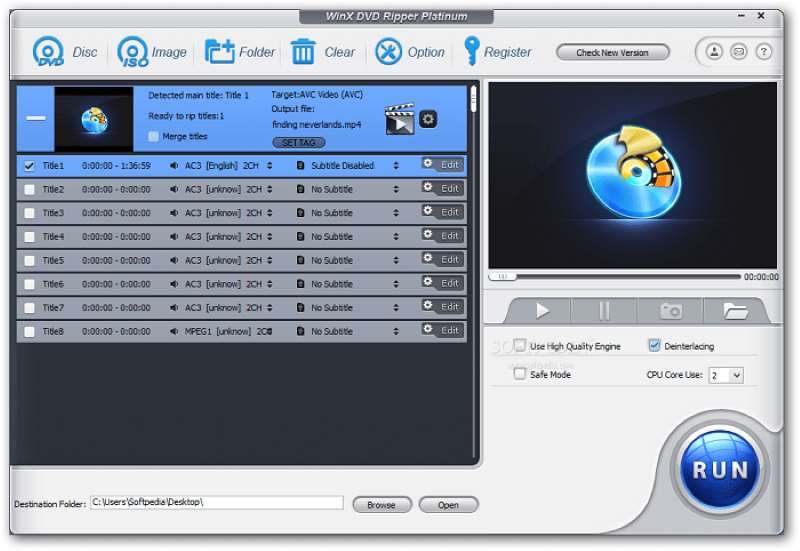
WinX DVD Ripper Platinum is designed for editing and ripping personal or commercial DVD videos. It supports converting DVDs to MP4 and other common formats for playback on a computer or other devices. You can use many built-in editing functions, like trimming, cropping, or removing the black bars. The fast DVD ripper offers a satisfying DVD ripping speed of up to 47×. For a full DVD to MP4 ripping, it only takes several minutes to complete. However, you may notice that the video quality can be reduced. Overall, with the smooth and quick DVD ripping feature, it was also regarded as one of the best DVD rippers by many users during its free trial period.
 Note
Note
Rip Your DVD Collection Easily with No Loss of Quality. If you have a lot of DVDs to rip without compression, WinX DVD Ripper may be unstable and always crash. VideoByte BD-DVD Ripper works perfectly, and its built-in video compressor would bring smarter and higher-quality help.
User Review
“Decent program with simple operation…I've had discs that fail which rip elsewhere first time. I've also had issues getting subtitles with this program and use an alternate for subtitled discs.” - From Trustpilot
| Best for | Ripping protected DVDs on Windows for free. |
| Pricing | Free |
| Supported OS | Windows 10/8/7/Vista |
| Ratings | 3.9/5 from Trustpilot |
Pros
Cons
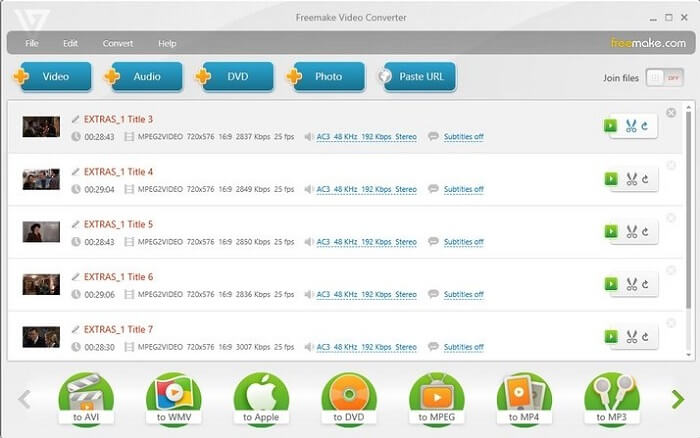
Freemake DVD Ripper is another free DVD ripping software that can rip video from DVDs, especially commercial DVDs with quick speed. It free rips encrypted DVDs to popular formats. If you have plenty of DVDs to rip, don’t worry about the ripping speed! This best free DVD Ripper will ensure a fast process with hardware acceleration methods applied.
However, compared to other professional DVD ripper software (like VideoByte offers 300+ formats), this free DVD Ripper offers
User Review
“Easy to use but bugs a lot for DVDrip. There is no content to read and see what you are loading, only the duration of the videos…Half of the time it bugs like…and waste more time than necessary.” - From Trustpilot
| Best for | Backing up most DVDs & Blu-rays including encrypted discs for free on Windows. |
| Pricing | Free |
| Supported OS | Only Windows |
| Ratings | 3.2/5 from Trustpilot |
Pros
Cons
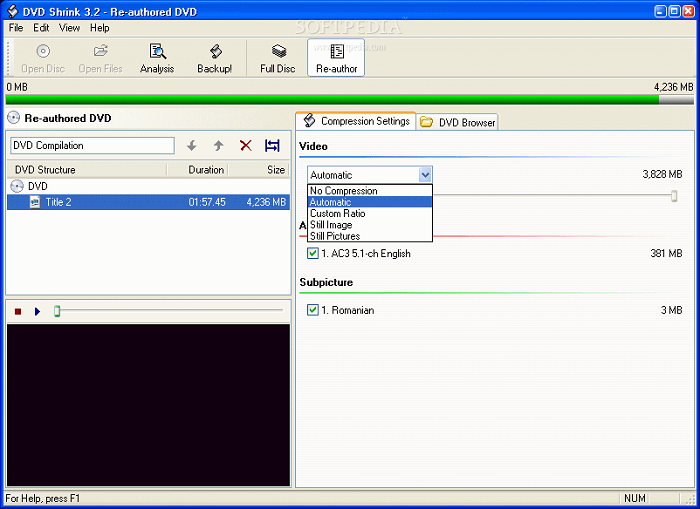
Another free DVD ripper for Windows, DVD Shrink excels in ripping copy-protected DVD content with very simple steps. It can remove common DVD copy protections, such as CSS, RC, RCE, etc., to help you back up your favorite DVD movies. Also, it supports detecting different DVD disc types and is able to rip videos to VOB files at a fast speed. Moreover, the DVDs ripped by DVD Shrink are of original quality, though this leads to large file sizes. Note that the development of this software was halted in 2005, so it may not be possible to remove the latest DVD protection. And if you want to transfer the converted files to particular devices, DVD Shrink may let you down because it only supports a few output formats.
User Review From VideoHelp
“It's FREE! Though it is no longer updated it still will rip many dvds, especially older ones.”
“…there is a minor bug in DVD-5 mode where the total file size may not be calculated correctly…If not protected, DVD Shrink works great. If protected, use DVDFab first.”
| Best for | Non-professionals want to rip high-quality DVD videos to various formats. |
| Pricing | Free trial provided (Basic One Year: $29.95/Lifetime Plan: $39.95) |
| Supported OS | Windows 11/10/8.1/8/7, macOS 10.13-26 |
| Ratings | 3.3/5 from Trustpilot |
Pros
Cons
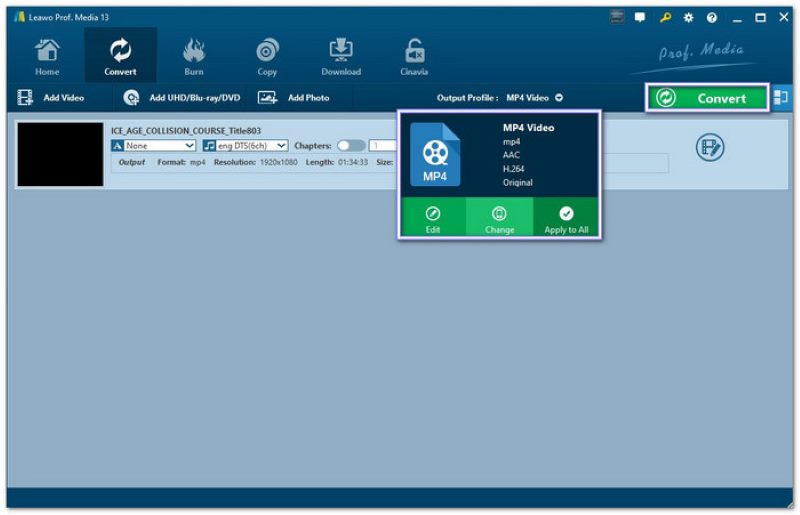
For those who want to rip DVDs to store on a computer or phone, Leawo DVD Ripper is one of the free DVD rippers you should not miss. It converts regional DVDs to over 180 formats, such as MKV, MP4, MPEG, AVI, and more compact formats designed for mobile devices, such as iOS, Samsung, Xperia, etc. It will keep the subtitles so that foreign audiences can understand the content after ripping DVDs and enjoy it offline. This DVD ripper software also provides a 3D movie creator, which will offer a more amazing video streaming experience.
But if you want to rip DVD to ISO files, Leawo cannot meet your needs, and you may turn to other free DVD rippers like VideoByte BD-DVD Ripper for help.
User Review
“What started out bad, ended up good! I’ve already ripped almost all of my DVD collection in just a couple of days! Everything worked seamlessly!” - From Trustpilot
| Best for | Non-professionals want to rip high-quality DVD videos to various formats. |
| Pricing | Free trial provided (1-Month Plan: $19.95/1-Year Plan: $54.95/Lifetime Plan: $79.95) |
| Supported OS | Windows 10/11 64-bit |
| Ratings | 3.8/5 from Trustpilot |
Pros
Cons
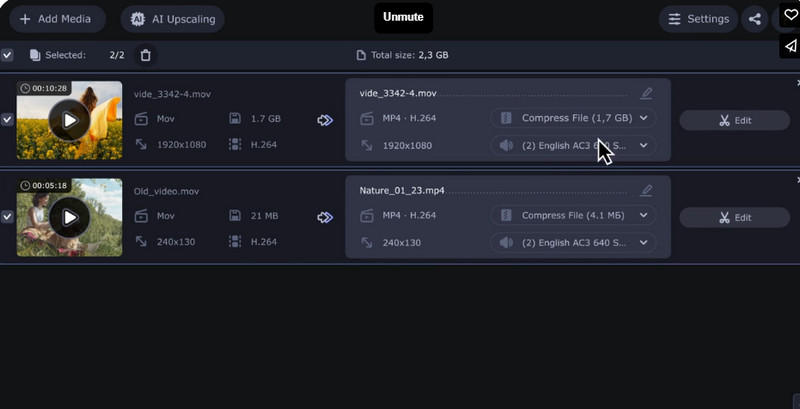
Don’t miss Movavi Video Converter if you are seeking a helpful free DVD ripper to rip videos from DVD discs to regular video formats, including MP4, MOV, AVI, and more. It offers high speed and good quality for saving DVD content so that you can enjoy cinema-like offline streaming on your computer.
Besides, it offers a straightforward interface, guiding you clearly on how to rip DVDs in just a few easy steps. However, it is a pity that the DVD ripper is not equipped with many quality customization settings or advanced editing features, which makes it unsuitable for advanced users. But with the free trial equipped, you are able to try this free DVD ripper before deciding whether to select it or not.
 Tips
Tips
Although Movavi Video Converter has gained a good reputation, for those seeking a feature-rich free DVD ripper, newer options like VideoByte BD-DVD Ripper are worth considering. VideoByte boasts a variety of advanced features for customization and provides regular updates, creating a more well-rounded free DVD ripping experience.
User Review
“It stands out for its intuitive interface, fast conversion, and support for a wide range of formats. The cons of Movavi include limitations in the free version, such as…Additionally, it lacks support for more advanced editing features that other software offers.” – From G2
| Software | Output Quality | Ripping Speed | Output Format | GPU Acceleration | Rip Protected DVD | Supported DVD/Blu-ray | Customize Video |
|---|---|---|---|---|---|---|---|
| VideoByte BD-DVD Ripper | 1080p HD & 4K | 6× | MP4, MKV, MOV, MP3, AAC, M4A, and 300+ | ✅ | ✅ | DVD/Blu-ray | ✅ |
| DVDFab DVD Ripper | 4K/5K/8K | 50× | MP4, FLV, MKV, AVI, WMV, M2TS, TS, etc. | ✅ | ✅ | DVD | ✅ |
| HandBrake | 480p/720p/1080p | Slow | .MP4, .MKV and WebM | Optional | ❌ | DVD (Need libdvdcss to rip some Blu-rays) | ✅ |
| MakeMKV | 720p | Slow | MKV | ❌ | ✅ | DVD/Blu-ray | ❌ |
| WonderFox DVD Ripper | 480p/ 720p/ 1080p/2K/4K/8K | Fast | M4V, WMV, AVI, MTS, M4V, etc. | ✅ | ✅ | DVD | ✅ |
| WinX DVD Ripper Platinum | 720p | 47× | MOV, MP4, M4V, WMV, AVI | ✅ | ✅ | DVD | ✅ |
| Freemake DVD Ripper | 4K | 47× | MP4, AVI, MKV, WMV, WebM, 3GP, SWF, FLV, MPG | ✅ | ✅ | DVD/Blu-ray | ✅ |
| DVD Shrink | Compressed | Fast | MP4, AVI, MPEG, MKV, etc. | ❌ | ✅ | DVD | ❌ |
| Leawo DVD Ripper | 720p/1080p/4K | 6× | MP4, MKV, AVI, WMV, etc. | ✅ | ✅ | DVD | ✅ |
| Movavi Video Converter | 4K | Fast | MP4, AVI, MKV, etc. | ✅ | ❌ | DVD | ✅ |
A: Yes. Many free DVD rippers are well compatible with Windows 11. You can install them and process smooth DVD ripping on your computers. But you need to be careful to distinguish that some tools don’t work on Windows 11, such as WinX DVD Ripper and Freemake DVD Ripper.
A: Make sure to choose a DVD ripper capable of removing copy protection and region codes if you are trying to rip copy-protected DVDs like commercial movies. If you do but still fail to rip it, check whether your DVD is scratched, or your computer CPU is overloaded. If your DVD is encoded with subtitles that are not supported by the DVD ripper, the process will also fail.
A: Online DVD converters are a good option for ripping DRM-free DVDs to MP4, MKV, MOV, and other popular formats. However, they often have limitations like file size restrictions, slow processing, and ads or watermarks, hindering a smooth experience. We recommend using free DVD ripping software to get more powerful features and a more stable experience.
Using the best free DVD rippers helps people to make backup copies of DVDs to store on more devices or use more types of media players. This article explores the 10 best free DVD Rippers that can help you easily rip a DVD to Windows, Mac, or Linux computers.
For free and open-source DVD rippers, Handbrake and MakeMKV are great options. If speed, high quality, wider format support, and additional features are your priorities, VideoByte BD-DVD Ripper stands out as the best DVD ripper. Now, let’s download its free DVD ripper and give it a try!
Hot Articles
by in 6 November, 2024
by in 1 November, 2024
by in 15 September, 2025

 English
  Korean
  Dutch
Dutch  Chinese (traditional)
  Italian
  Spanish